

Stefan Eike
Inspiring
August 19, 2021
Answered

Random characters are not correctly displayed

  • August 19, 2021
  • 5 replies
  • 516 views

Hi,


one FrameMaker instance (technical writer located in India) cannot correctly render some characters in a MIF file. I don't recognize any systematical logic.
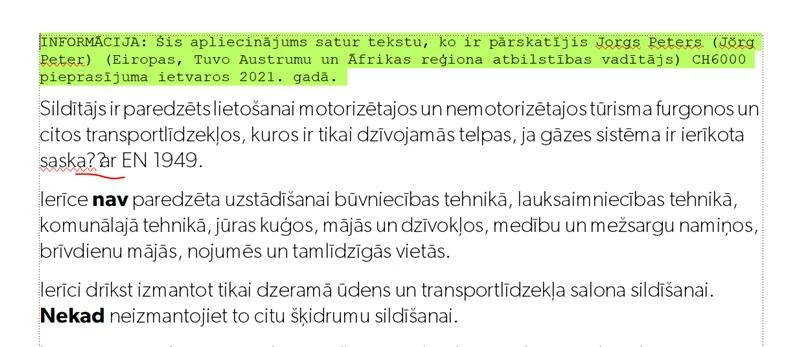
 

What is really strange is, that the ciphered chars "ņ" and "ā" are correctly displayed in the same file at a different position. The problem is reproducible, but only on one specific computer/FrameMaker instance.


Do you have an idea? I've already tried setting the Windows locale to UTF-8, but this did not help.

https://superuser.com/questions/1033088/is-it-possible-to-set-locale-of-a-windows-application-to-utf-8


Adobe does not allow me to upload the original MIF file, therefore I've renamed the MIF to TXT and upload it here. If you want to open the file, please rename the file extension from TXT to MIF first.

This topic has been closed for replies.
Correct answer Stefan Eike

Hi,

the problem has been solved now. The reason is still a mystery but it has helped to upgrade FM from 2019 to 2020.

BR

Stefan

5 replies

Stefan Eike
Stefan EikeAuthorCorrect answer
Inspiring
August 30, 2021

Hi,

the problem has been solved now. The reason is still a mystery but it has helped to upgrade FM from 2019 to 2020.

BR

Stefan

Jeff_Coatsworth
Community Expert
Community Expert
August 20, 2021

All I'd suggest is contacting the FM folks - see https://helpx.adobe.com/contact/enterprise-support.other.html#framemaker for your Adobe Support options. I'd recommend using the tcssup@adobe.com e-mail address as it reaches a team dedicated to Technical Communication Suite products including FrameMaker.

Bob_Niland
Community Expert
Community Expert
August 19, 2021

Normally, an unexpected "?" means one of two things:
1. The currently applied font does not populate the Unicode BMP codepoint. FM does not do fallback.
2. It's a Unicode SMP codepoint (above U+FFFF, and thus not supported yet by FM at all).


In this case, these are both BMP codepoints, which rules out the SMP limitation.

ņ U+0146 LATIN SMALL LETTER N WITH CEDILLA
ā U+0101 LATIN SMALL LETTER A WITH MACRON
and this would still be the case even if these are composed characters using the
Unicode combining cedilla (U+0327) and macron (U+0304).


This suggests something peculiar with the fonts on the machine exhibiting the artifact.

Stefan Eike
Inspiring
August 20, 2021

Hi Bob,


Thanks a lot for digging into this. Unfortunately that cannot be the problem. We have compared the installed fonts on the affected computer with the fonts we use on other tech writer machines. The fonts are exactly the same.

This is really confusing to me, as the issue seems to be absolutely random.


Any other ideas?


Jeff_Coatsworth
Community Expert
Community Expert
August 19, 2021

Have you looked at the FM file at the spot where those two characters are giving you problems? Does replacing them fix anything in the MIF?

Stefan Eike
Inspiring
August 19, 2021

I'm not really sure what you mean. When I save the MIF to FM on this computer, the problem remains. The affected content snippet is:

<Para 
  <Unique 1050907>
  <PgfTag `BodyText'>
  <PgfReferenced Yes>
  <ParaLine 
<Unconditional > 
<String `Sildītājs ir paredzēts lietošanai motorizētajos un nemotorizētajos tūrisma furgonos un citos transportlīdzekļos, kuros ir tikai dzīvojamās telpas, ja gāzes sistēma ir ierīkota saskaņā ar EN'>
<Char HardSpace>
<String `1949. '>
  > # end of ParaLine
 > # end of Para
Stefan Eike
Inspiring
August 19, 2021

I'm also not allowed to upload a MIF file renamed to TXT. This link guides you to the MIF file: https://wetransfer.com/downloads/8603c98c3eb2be93a7b55f4d7b35b5b620210819150238/9c350c01b26f8697088dbc7d6fd61d3620210819150251/f539b8