


Reading raster image DPI while importing
Hi All,
Creating a simple script to import a graphic into an anchored frame document. All is working fine, but I cant find a way to read the DPI from the raster image so I can modify the now hard-coded value on lines 10-11.
I found: Constants.FS_InsetRasterDpi, but this seems to be for SVG data.
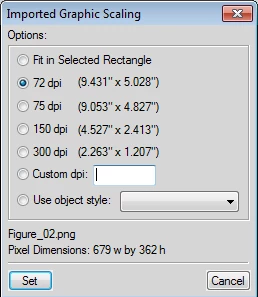
I assume it has something to do with the Imported Graphic Scaling dialog (see image below).
Any ideas?
Thanks in advance.
if(myFrame != null){
//only proceed if valid frame
var props = new PropVals();
var strFilename = "";
props = GetImportDefaultParams();
var index = GetPropIndex(props, Constants.FS_HowToImport);
if(index > -1) props[index].propVal.ival = Constants.FV_DoByRef; //import by Reference
index = GetPropIndex(props, Constants.FS_FitGraphicInSelectedRect); //Do not fit
if(index > -1) props[index].propVal.ival = false;
index = GetPropIndex(props, Constants.FS_GraphicDpi); //96 DPI
if(index > -1) props[index].propVal.ival = 96;
index = GetPropIndex(props, Constants.FS_ShowBrowser); //ShowBrowser to get file
if(index > -1) props[index].propVal.ival = 1;
}
later...
oDoc.Import(oDoc.TextSelection, path, props, returnParms);


 AdChoices