
jenna_frenak
Inspiring
November 20, 2024
Question

Receiving Internal Error 17024 and 17054 When Attempting to Save Documents as PDF

  • November 20, 2024
  • 3 replies
  • 786 views

Hi all,


Ever since yesterday, whenever I try to save a document as a PDF, I'm getting the following error messages:
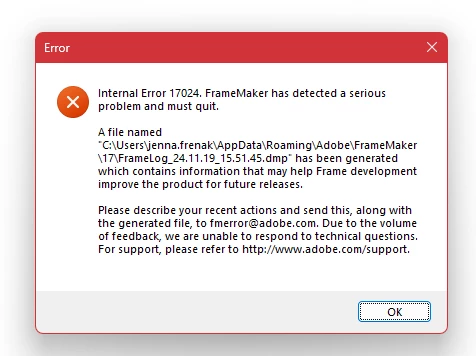
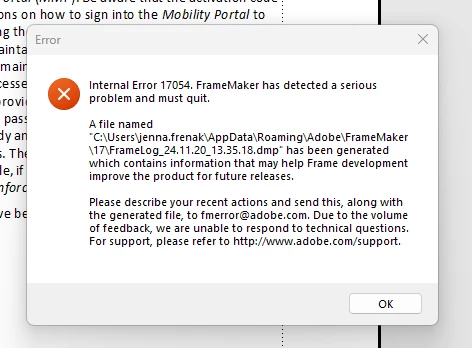
 

After I click OK, Frame stops responding and then crashes/closes immediately. I've tried the following:

  • Using File > Save as PDF (this is my normal go-to method for full chapters/books)
  • Using the Publish pod
  • Updating Frame
  • Using different documents
  • Saving as new file and replacing existing file
  • Rebooting laptop


None of the above has worked and none of my coworkers are having this issue either. I did email Adobe support this morning, but the email address they include in the error messages bounces back lmao.


Has anyone seen this or know how to fix it? I'd like to avoid uninstalling/reinstalling frame if possible as my IT team would need to do that. 


Thanks!

This topic has been closed for replies.

3 replies

Community Expert
November 21, 2024

Is your printer setup set to Adobe PDF?


Bjørn Smalbro - FrameMaker.dk
jenna_frenak
Inspiring
November 21, 2024

Yes, but I'm not having issues with printing to PDF. I'm having issues with the File > Save as PDF option.

Community Expert
November 22, 2024

Good morning!

Can you open the Publish pod, select PDF and open the sts file? What's the setting of "Use Acrobat Distiller for PDF Generation"? Can you post a screenshot of this dialog? What happens, when you switch this setting?

What happens, when you close FrameMaker and then rename your linguistics folder?

C:\Users\Your.Name\AppData\LocalLow\Adobe\Linguistics\ folder

When you restart FrameMaker, it will recreate this folder.

When everything works, you can copy your spelling and hyphenation file to the new folder (or import it into the existing file):

c:\Users\REWI\AppData\LocalLow\Adobe\Linguistics\UserDictionaries\FMUserDictionary\all\added.txt

Often this folder is the cause of FrameMaker crashes.

Best regards, Winfried

Jeff_Coatsworth
Community Expert
Community Expert
November 20, 2024

Yeah, that "errors" email has been out of commission for awhile - it's only useful for reporting errors to the programmers; no support is provided with that email. Use tcssup@adobe.com to ping the FM folks. 
However, is the error happening on a new doc? If so, then try deleting or removing your C:\Users\Your.Name\AppData\LocalLow\Adobe\Linguistics\ folder and restart FM. 
Your PDF creation methods are both using the same mechanism (Save As & Publish are the same); try Print to AdobePDF printer instance.

jenna_frenak
Inspiring
November 20, 2024

I actually sent my email to them too, hopefully it went through even though I got the bounceback because of the other email address... 


Not new documents though! These are all documents that have been in existance for years and I never changed any settings for them. My coworker was able to open one of them and generate the PDF for me with no issues, so it's definitely something on my FM's end it seems. Printing does work, but I still need to be able to use save as PDF for full chapters/books.

Jeff_Coatsworth
Community Expert
Community Expert
November 21, 2024

So a new doc works; the old docs throw the error - right? And the same old docs on somebody else's machine don't throw the error - correct?
If that's the case, then there must be something going sideways on your install/environment that's causing the failure in those old docs. Did you try the "Linguistics" trick mentioned above? Are there differences in the point versions of FM between you & your co-workers?

jenna_frenak
Inspiring
November 20, 2024

Also, forgot to add... I'm running FrameMaker 2022, version 17.0.5.725