Participating Frequently
March 6, 2025
Answered

Reduce list of variables to user variables only?

  • March 6, 2025
  • 5 replies
  • 1078 views

Hi there everybody,


is there a way to get rid of the system variables in the list? Something like adding a new filter that only leaves the user variables in the list?

The daily work is straining with the long list of all the variables that I hardly ever use! I do not want to scroll and search each time when I want to insert one of our variables.


Thanks a lot in advance!



Correct answer frameexpert

In the Variables pod above the list of variables there is a text box to filter for any part of the variable name or variable value. When you type, the list gets filtered.

You can also sort the list of variables by clicking on the column header.


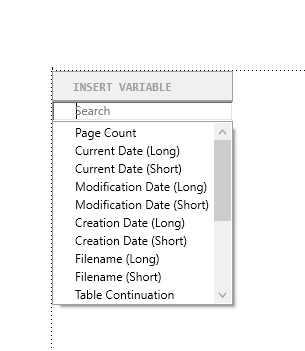
You can also press Control+0 (zero) at the insertion point and be prompted for a variable:


5 replies

Dave Creamer of IDEAS
Community Expert
Community Expert
March 9, 2025

This would be a PIA on an existing project, but I start all my user variables with "1_". That puts them all at the top. 

I believe Silicon Prairie Software's Variable plugin allows for batch renaming based on a table. 


David Creamer: Community Expert (ACI and ACE 1995-2023)
Participating Frequently
March 10, 2025

Thanks for hinting at Silicon Prairie Software! They have quite interesting plugins!

Barb Binder
Community Expert
Community Expert
March 8, 2025

Hi @jw71500773:


Did you play around with Winfried's idea of sorting the columns by definition? Since Fm's system variables mostly begin with <& (table variables start with an open parenthesis) and user variables tend to start with letters or numbers, that would group them all at the top (or bottom of the list), just as it would if the gear icons had their own column.


I know you aren't open to renaming your user variables, but I prefer Rick's suggestion of assigning them with Ctrl-0, first letter(s). It's similar to using Ctrl-8 and Ctrl-9 to assign styles from the keyboard: thoughful style naming makes it easier to get to the style you need without much effort. As an example, starting user variables with a number would make it super quick. Ctrl+0, 1, Enter could assign 1DocTitle, and Ctrl+0, 2, Enter might assign 2RevisionNumber.


If you still just want the gear icons in a sortable column, you could log your idea as a feature request, here https://tracker.adobe.com/#/home and hope for the best. 


~Barb

~Barb at Rocky Mountain Training
Participating Frequently
March 10, 2025

Feature requested!

Thanks for the link!

Community Expert
March 6, 2025

Hi,

You know that you can easily filter the list of variables? Then only the relevant variables are shown.

Best regards, Winfried

Participating Frequently
March 6, 2025

"You know that you can easily filter the list of variables? Then only the relevant variables are shown."

*************

I only have the currently open fm documents in the filter list, and "Current document" and "All open documents". That's it! No sign of any other filtering criteria other than the fm document!


Do you have more filters? If yes, then the question is: How did you get them?

Community Expert
March 6, 2025

In the Variables pod above the list of variables there is a text box to filter for any part of the variable name or variable value. When you type, the list gets filtered.

You can also sort the list of variables by clicking on the column header.

Jeff_Coatsworth
Community Expert
Community Expert
March 6, 2025

I've not heard of any way to remove system variables - I guess one workaround would be to code your ones in some way that they all get sorted together at the top of the list?

Participating Frequently
March 6, 2025

Thanks a lot, but that is no practical solution, because we would have to adapt lots of process documents and our variable lists and our scripts, and - last but not least - we would have to rename all variables in all fm documents we work on.

It would be so easy to put the red and blue icons in a column of their own and let the users sort the list by this column.


Participating Frequently
March 6, 2025

Forgot to mention:

Windows 11, Framemaker 17 (2022)