
nancy33534756
Inspiring
April 25, 2018
Answered

Reference page graphic disappears from published .chm

  • April 25, 2018
  • 5 replies
  • 1055 views

Hello, all.

I am using FM 2015 in a Win 10 environment.

Here is a detailed explanation of a table format using a paragraph tag that employs "frames" in a wonky way, icons, and the reference page. The explanation leads to this question: why do certain warning icons disappear from my .chm output?

Our documents contain notes, cautions, and warnings. Each has an associated icon:
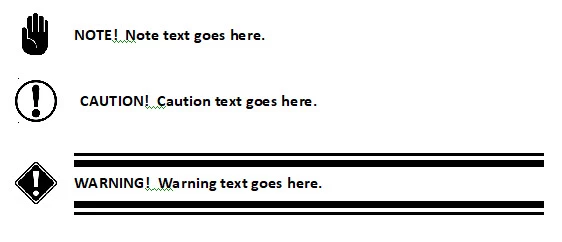
The Note, Caution, and Warning formats are actually tables:
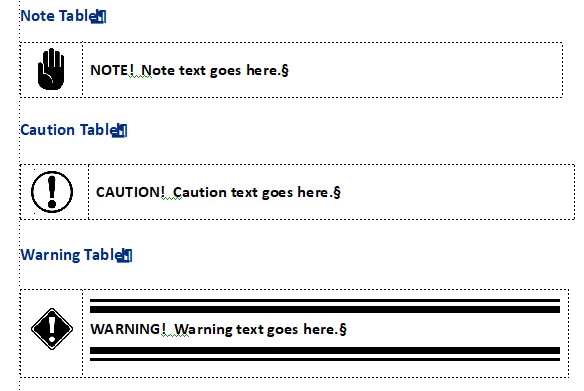
Each table is a separate table format.

The Note, Caution, and Warning icons are integral to three paragraph formats: zzNote, ZZCaution, and ZZWarning. Each of these paragraph formats employs an icon graphic that is stored on the Reference page. These icons are treated like "frames," even though they are in fact graphics.

As an example, the Warning table uses the zzWarning paragraph format in the left-hand cell. It supplies the hand graphic as a frame. It is called "Warning" and is named "Warning" on the reference page:
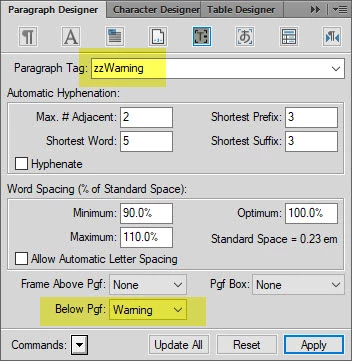
On the Reference page, the Warning "frame" is actually this graphic. I typed the word "Warning" underneath the graphic, but the graphic itself is also named "Warning" (if you click on it, you see that name). Here are all three as they appear on the Reference page:
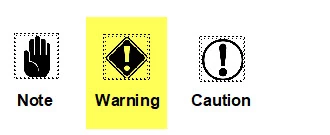
So, the table uses the ZZWarning paragraph format in the left-hand column to populate it with the warning icon:
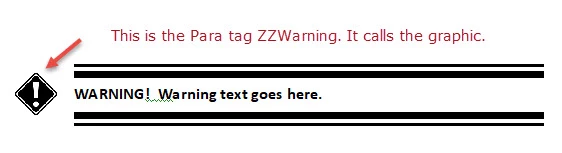
Whenever I insert a Warning table in a .fm file, the exclamation icon appears in the left-hand cell, and the two rules appear in the right cell. (They are attached to a "WarningText" paragraph format that calls those frames from the Reference page.)

Okaaayyyyyy.

So, when I publish a .chm from the .fm file, I get both columns of the Note, Caution, and Warning tables. In the case of the Warning tables, I get the rules above and below the text, which are also stored on the Reference page. They behave as expected. But the icons disappear.

Why do the icons drop out?

All suggestions gratefully received.

--Nancy

    This topic has been closed for replies.
    Correct answer Matt-Tech Comm Tools

    Hi, Matt! That was very helpful and I've used your technique of putting the font in a plain Body tag.

    I also created a Warning tag that showed up in the Output Style drop-down list. Now to understand this prefix of which you speak. Can you point me in the right direction? I need to do something to make that .css entry recognize the graphic file for the icon that appears in the table.

    Thanks again.

    --Nancy


    Hi Nancy, check out the CSS Cookbook published by O'Reilly for CSS code snippets to do what you're looking for

    5 replies

    nancy33534756
    Inspiring
    April 27, 2018

    Thanks for those references, Bob.

    Bob_Niland
    Community Expert
    Community Expert
    April 26, 2018

    Workflow issues aside, you might alert your document architect or safety coordinator that those icons may not comply with relevant safety standards (ANSI Z535 and ISO in particular).

    nancy33534756
    Inspiring
    April 26, 2018

    I don't see a way to edit what I just posted less than a minute ago, so I'll add this.

    I've used the Style Mapping tab in the Publish settings window. I see that this is somehow related to a .css file, even though when I search my working FM directory, it does not contain a .css. So evidently, by using the Style Mapping tab, I am in fact editing a .css, even though no such .css exists in my directory. I do not understand this. If that is the case, what is the .sts file?

    Matt-Tech Comm Tools
    Community Expert
    Community Expert
    April 26, 2018

    Hi Nancy, the CSS is actually part of what is stored in an STS file.

    Here's a post I created that contains video with the process of editing the CSS

    http://techcommtools.com/formatting-branding-html5-content-framemaker-2015/

    You may also find my free mini course on HTML5 publishing useful as well...

    http://techcommtools.com/free-html5-publish-training/

    -Matt

    -Matt Sullivan, FrameMaker Course Creator, Author, Trainer, Consultant
    nancy33534756
    Inspiring
    April 26, 2018

    Hi, Matt! That was very helpful and I've used your technique of putting the font in a plain Body tag.

    I also created a Warning tag that showed up in the Output Style drop-down list. Now to understand this prefix of which you speak. Can you point me in the right direction? I need to do something to make that .css entry recognize the graphic file for the icon that appears in the table.

    Thanks again.

    --Nancy

    nancy33534756
    Inspiring
    April 26, 2018

    Hi, Matt.

    You have hit on something that I haven't been able to figure out: the relationship between a .sts file and a .css file. I have created quite a few conversion settings in the .sts file. I don't have any .css file at all. Where would I get one? Do I have to create it from scratch? I've put a lot of work into the .sts file. Do I have to abandon it?

    And, once I understand that, I don't know what you mean about defining a style with a prefix in the css ...

    I looked for a Youtube video on this and also poked around in your wonderful book. So far, haven't found a good resource to help me get grounded in these topics. Your suggestions are most welcome.

    --Nancy

    Matt-Tech Comm Tools
    Community Expert
    Community Expert
    April 25, 2018

    Hi Nancy, the icons are dropping out because they're not actually content in your document, but are formatting applied above or below your "content" (quotes applied because your paragraph actually contains no content)

    You need to map your zzWarning tag to a style defined in your CSS (perhaps named Warning). Then define the CSS style with a prefix so that the image appears.

    -Matt

    -Matt Sullivan, FrameMaker Course Creator, Author, Trainer, Consultant