
Known Participant
October 7, 2020
Answered

Remove Hyphens and alter text

  • October 7, 2020
  • 1 reply
  • 2932 views

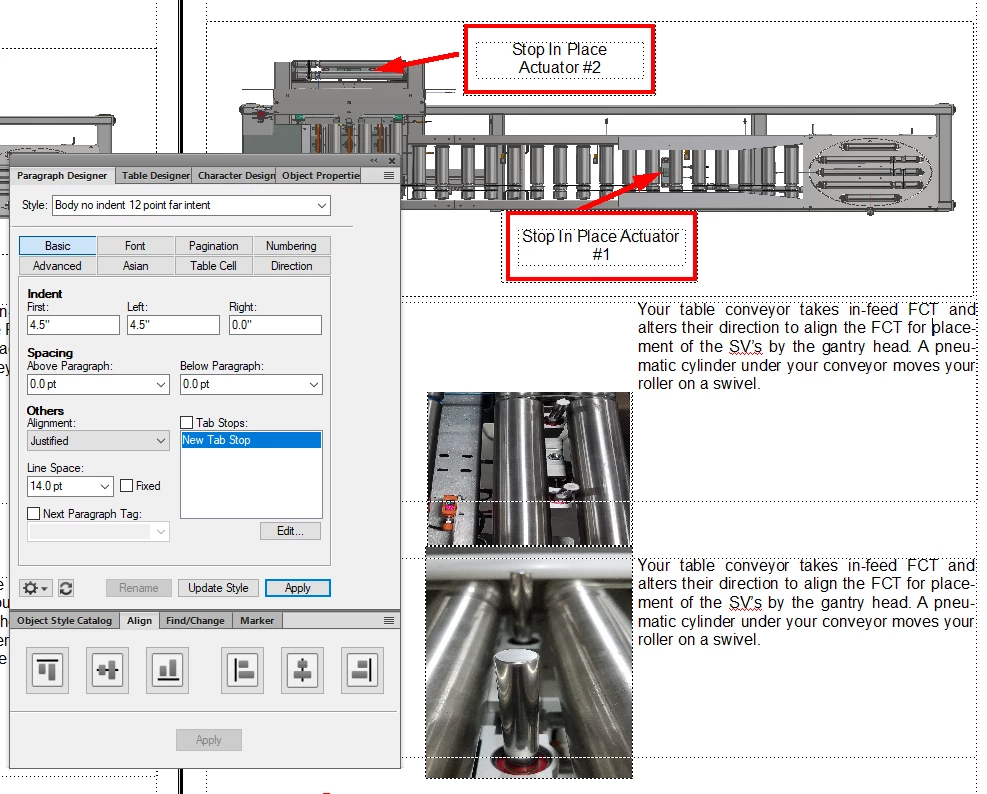
I need to remove the hyphens that are occurring in a lot of paragraphs. I am trying to keep the text in select indent parameters for a service manual. How can i remove the constant hyphens but still make the text-align on the right and left-hand side. See attached photo. The text boxes on the lower right side. My documents all look like this. The pressure is on at my job, and i have to make sure these look uniform and professional. I appreciate the help.
This topic has been closed for replies.
Correct answer LinSims

what i meant what when i select justified. it still hyphenates the words. i am looking for a settings to remove this hyphen and maybe adding spaceing automatically to the document to correct the alignment issue 


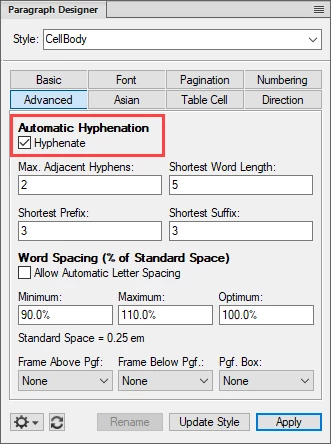
Turn off automatic hyphenation in the paragraph tags. You can also play with the percentages in the word spacing to make it look a bit better, but I have no real experience with that. I wouldn't turn on the Automatic Letter Spacing, as that might make the letters in each word space weirdly far apart.


1 reply

Jeff_Coatsworth
Community Expert
Community Expert
October 7, 2020

You mean those auto-hyphens in "placement" and "pneumatic"? They aren't really in the text; that's just FM trying to hyphenate them for you. I think you just need to change your alignment to full.

beau5CC8Author
Known Participant
October 7, 2020

its a text break because the word is to big and has to be carried over. how do i minimize the carryover or prevent it from breaking the word in half?