bronxguys02
Known Participant
March 22, 2024
Answered

Remove space above table

  • March 22, 2024
  • 1 reply
  • 417 views

In the screen shot attached, I have text on page 8 and I want Policy - Configuration - Uncategorized and the text and following table to continue in the space on page 8 instead of starting at the top of page 9.  Probably a simple fix but haven't run into this previously. Thanks.

This topic has been closed for replies.
Correct answer frameexpert

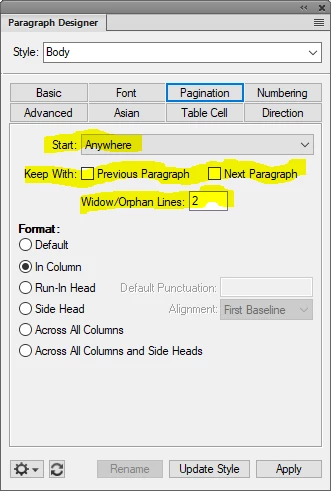
Click through your paragraphs and check the highlighted properties below to see what is preventing the content to start of the previous page.


1 reply

frameexpert
Community Expert
frameexpertCommunity ExpertCorrect answer
Community Expert
March 22, 2024

Click through your paragraphs and check the highlighted properties below to see what is preventing the content to start of the previous page.


bronxguys02
Known Participant
March 22, 2024

Thank you so much! 

Bob_Niland
Community Expert
Community Expert
March 22, 2024

And if that doesn't fix it, also check the para after the table. If it has Keep With Prev set, it can drag the table to its page.