

Fightergator
Inspiring
August 22, 2022
Answered

Replace Text After Find

  • August 22, 2022
  • 5 replies
  • 1146 views

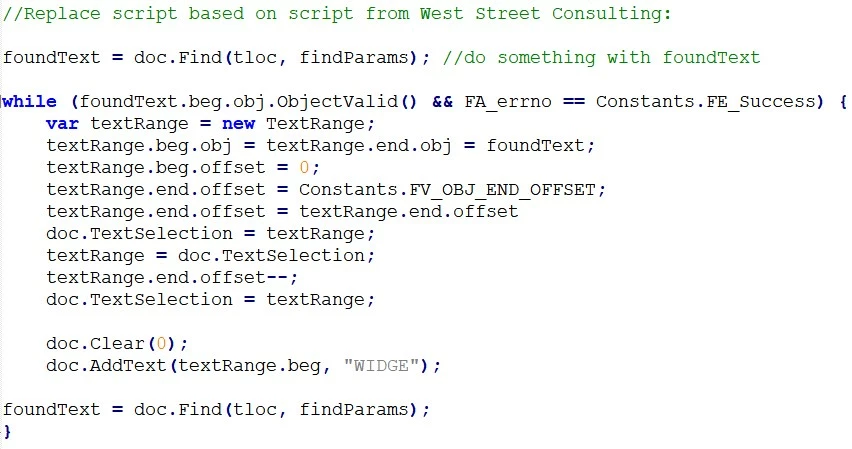
Thanks to our Frame experts, I've developed a script that finds all occurances of a word or string in a document.  When found, I want to replace the word and display it as a Track Text Edit.  I'm running into two problems.  1) After enabling Track Text Edits and running the script, all change appear as normal text; not Track Text Edits.  2) The beginning offset of the text range is correct, but the doc.Clear and doc.AddText leaves the last character of the found text after the replacement text is added; e.g., foundText = "widge"; replacement = "WIDGE"; result = "WIDGEe". 
 

    This topic has been closed for replies.
    Correct answer frameexpert

    Nice Russ! The only thing I wonder that the original poster may not have thought of: instead of deleting the original text, it may be more appropriate to leave it and apply the FM8_TRACK_CHANGES_DELETED condition format to it. That way, he could reject each change if appropriate. That assumes that just applying these conditions automatically triggers the ability to reject/accept these particular changes.

    5 replies

    Fightergator
    Inspiring
    August 23, 2022

    Many thanks to everyone for your excellent comments.  The line reducing the end-offset by 1 resulted from using some code I found and tweaking it until I was beginning to get a result that approximate what I was looking for.  I'm a JavaScript novice, so didn't realize I was reducing the end-offset--.  Also, much appreciate the point out to text conditions. I spent hours yesterday trying to find anything that explained how to do it, including playing with the Constants.FP_TrackChangesOn. 

    Legend
    August 23, 2022

    Yes. So, combining the comments of all the others, here is a script that seems to work for me. It is especially tricky to simulate the track edit function, because it is apparently just a conditional tag (?) and it is not straightforward to apply a condition tag with ExtendScript. At least, you have to do things that are not in the documentation and probably would never figure out on your own. I found the answer by searching this forum. Hope this helps. -Russ


    function findAndReplace(findString, replaceString)
    {
        var textRange = app.ActiveDoc.TextSelection;
        if(!textRange.beg.obj.ObjectValid())
        {
          alert("No insertion point or active document. Cannot continue.");
          return;
        }
        var doc = app.ActiveDoc;
        
        // Set up the propVal to apply the track changes condition
        var condFmt = doc.GetNamedCondFmt("FM8_TRACK_CHANGES_ADDED");
        var textProp = doc.GetTextPropVal(textRange.beg,Constants.FP_InCond); 
        textProp.propVal.isval[0] = condFmt.id;
        textProp.propVal.osval[0] = condFmt;
        
        // Set up the find parameters
        var findParams = AllocatePropVals (2);    
        findParams[0].propIdent.num = Constants.FS_FindText;    
        findParams[0].propVal.valType = Constants.FT_String;    
        findParams[0].propVal.sval = findString;    
       
        findParams[1].propIdent.num = Constants.FS_FindWrap;    
        findParams[1].propVal.valType = Constants.FT_Integer;    
        findParams[1].propVal.ival = false;  
         
        // Start the search 
        textRange = doc.Find(textRange.beg, findParams);
          
        while(textRange.beg.obj.ObjectValid() && FA_errno == Constants.FE_Success) 
        {
          // Set up the text range that will ultimately represent the new string (after the replacement).
          // This will be used to apply the track changes condition.
          var replaceTextRange = doc.TextSelection;
          replaceTextRange.end.offset = replaceTextRange.beg.offset + replaceString.length;
    
          // The search string is already selected. Delete it.
          doc.Clear(0);
          
          // Add the new text.
          doc.AddText(textRange.beg, replaceString);
    
          // Apply the track changes condition to the new text.
          doc.SetTextPropVal(replaceTextRange, textProp);   
         
          // if(!confirm("Found something. Continue?")) return;
        
          textRange = doc.Find(textRange.beg, findParams);
        
        }
    }
    frameexpert
    Community Expert
    frameexpertCommunity ExpertCorrect answer
    Community Expert
    August 23, 2022

    Nice Russ! The only thing I wonder that the original poster may not have thought of: instead of deleting the original text, it may be more appropriate to leave it and apply the FM8_TRACK_CHANGES_DELETED condition format to it. That way, he could reject each change if appropriate. That assumes that just applying these conditions automatically triggers the ability to reject/accept these particular changes.

    Fightergator
    Inspiring
    August 23, 2022

    My thanks to everyone for the helpful recommendations. Find / replace routine is working as you can see from the snippet below.


    Here's coding I ended up with...I'm open to any suggestions on how I can improve it...


    // Added a second propVal to apply track deleted condition.

    var condFmt = doc.GetNamedCondFmt("FM8_TRACK_CHANGES_DELETED");
    var deletetextProp = doc.GetTextPropVal(textRange.beg,Constants.FP_InCond);
    deletetextProp.propVal.isval[0] = condFmt.id;
    deletetextProp.propVal.osval[0] = condFmt;


    while (textRange.beg.obj.ObjectValid() && FA_errno == Constants.FE_Success) {
    // Count number of findString's found
    n = n + 1

    // Set up the text range that will ultimately represent the new string (after the replacement).
    var replaceTextRange = doc.TextSelection;
    replaceTextRange.end.offset = replaceTextRange.beg.offset + replaceString.length;


    // The search string is already selected, so apply the track changes deleted condition

    // to the found text.

    doc.SetTextPropVal(textRange, deletetextProp);

    // Add the new text.
    doc.AddText(textRange.end, replaceString);

    // Apply the track changes condition to the new text.
    replaceTextRange = doc.TextSelection;
    replaceTextRange.beg.offset = replaceTextRange.end.offset;
    replaceTextRange.end.offset = replaceTextRange.beg.offset + replaceString.length;
    doc.SetTextPropVal(replaceTextRange, textProp);

    // if(!confirm("Found something. Continue?")) return;
    textRange = doc.Find(textRange.beg, findParams);

        }

    }

    frameexpert
    Community Expert
    Community Expert
    August 23, 2022

    There are a few problems with your code. The Find method already returns a TextRange there is no need to create a new one. You can simply do this to delete the old text and add the new text:

    doc.DeleteText (foundText);

    doc.AddText (foundText.beg, "WIDGE");

    K.Daube
    Community Expert
    Community Expert
    August 23, 2022

    Why do you reduce the end-offset by 1 with

    textRange.end.offset--;

    I would not do that.

    Community Expert
    August 23, 2022

    Hi,


    I cannot comment why the last character of your original text is not replaced.

    Regarding the Track Text Edit: Internally Track Text Edits is text which has a condition:

    FM8_TRACK_CHANGES_ADDED for new text.

    FM8_TRACK_CHANGES_DELETED for deleted text.

    You can check this also, when you save your file as MIF and check the code.

    Therefore FrameMaker will not apply these Track Text Edits conditions automatically, when you run a script. You have to apply these conditions.

    Some of our ExtendScript developers here could comment, if my explanation is correct.


    Best regards


    Winfried