
Participant
June 3, 2021
Answered

Resize text frame

  • June 3, 2021
  • 2 replies
  • 780 views

Hi!

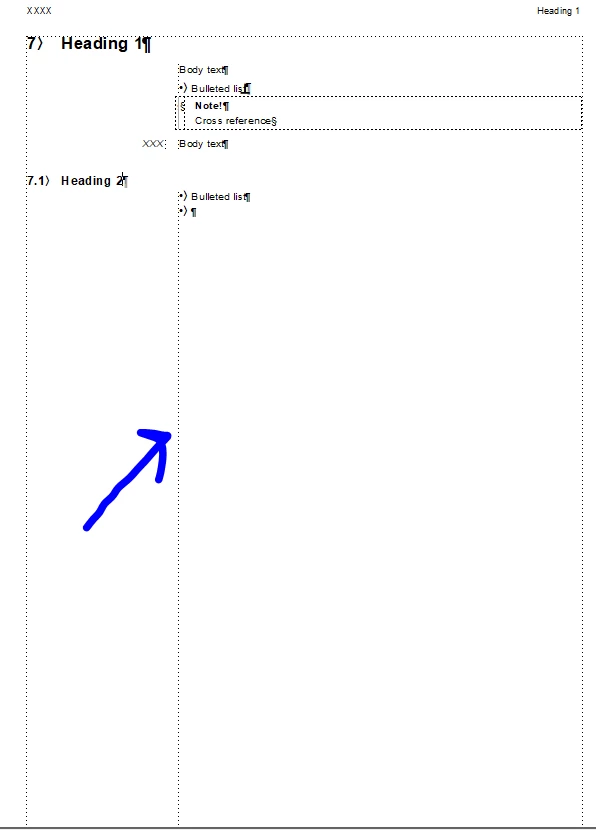
I'm quite new to FrameMaker and I have a questions regarding resizing a text frame. I know how to resize waht I believe are the margins by using ctrl + click the dotted lines of the whole page. But how do I resize a text frame within the whole page? See the blue arrow below. I would like to know how to resize the text frame were the blue arrow points at to be able to adjust it more to the left or right.


The page have a one column layout.
    This topic has been closed for replies.
    Correct answer LinSims

    Just for the one page, or for all pages in the document? For the one page, you can use the ctrl+click trick to resize. Otherwise, you have to adjust the page layout on what's called the Master Page.


    Click View > Master Page to access that, then right click on the frame and select Object Properties from the pop-up menu. It should show you Text Frame by default.


    What you have is a single column layout with a sidehead, so what you need to do is find the field labeled Width (which is under Room for Side Heads) and change it to the width you want your sidehead to be.


    Click Apply and (if it doesn't close) close the Object Properties window, then click View > Body to return to the input area of the document.

    2 replies

    Community Expert
    June 7, 2021

    Sometimes CTRL+click does not work. (I do not know why.)

    Then you have to press the mouse button outside of your main text frame draw a rectangle around your text frame.

    This selects the frame as well.

    LinSims
    Community Expert
    LinSimsCommunity ExpertCorrect answer
    Community Expert
    June 3, 2021

    Just for the one page, or for all pages in the document? For the one page, you can use the ctrl+click trick to resize. Otherwise, you have to adjust the page layout on what's called the Master Page.


    Click View > Master Page to access that, then right click on the frame and select Object Properties from the pop-up menu. It should show you Text Frame by default.


    What you have is a single column layout with a sidehead, so what you need to do is find the field labeled Width (which is under Room for Side Heads) and change it to the width you want your sidehead to be.


    Click Apply and (if it doesn't close) close the Object Properties window, then click View > Body to return to the input area of the document.

    Participant
    June 4, 2021

    Hi LinSims,


    Your suggestion worked perfectly, thank you! You saved me hours of work - I had never figured this out on my own 🙂

    LinSims
    Community Expert
    Community Expert
    June 4, 2021

    You're more than welcome. 


    I suggest you get Klaus Daube's "Compendium" PDF, which is an excellent source on how to use FrameMaker and various tips for getting things done. You can find it here: https://www.daube.ch/docu/files/compendium.pdf


    Also, please mark my answer correct. 🙂