
QuintinSeegers
Legend
February 9, 2022
Answered

Restructure Structure using conversion table - FM2019

  • February 9, 2022
  • 2 replies
  • 918 views

In our documents (structured), we use a Table Element (Notes) to insert notes. We've now decided to change the formatting of the notes, adding a line above and below the table. To achieve this, we've created a new Element (Remarks), which automatically inserts the LineBeforeNote, Notes and LineAfterNote Elements. When inserting the Remarks Element manually, we get the results we're after.


As you can image, we have several of these historical Notes that we need to convert to the new structure. I know we can use a Conversion Table to wrap the existing Notes Element in a Remarks Element. However, doing this results in the LineBeforeNote and LineAfterNote Elements missing. Is there a way to insert these as part of the Conversion, or do we have to go through all our documents and manually add the two additional elements?


We are not using XML or DITA - just Structured FM with an EDD.
    This topic has been closed for replies.
    Correct answer frameexpert

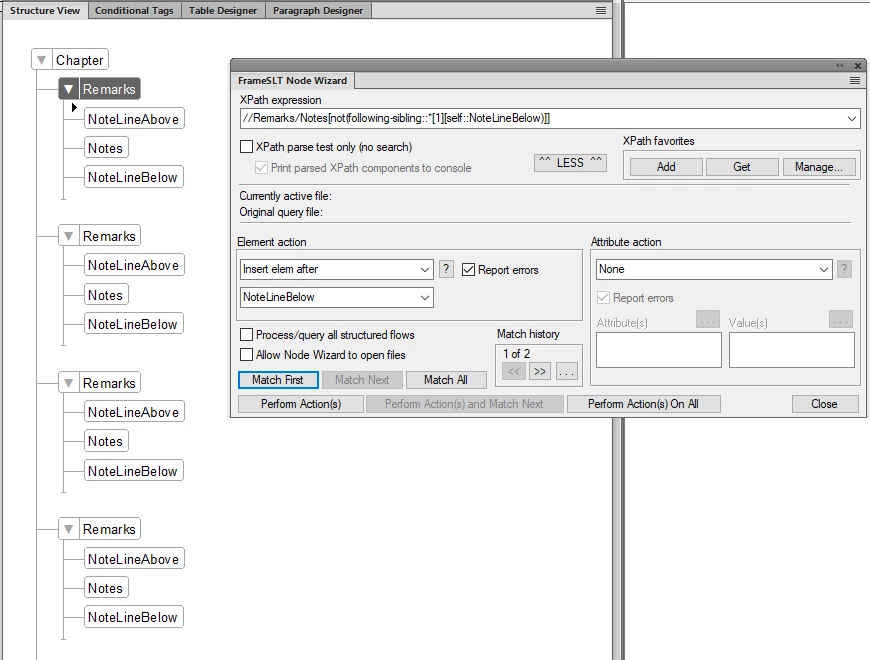
    Then repeat for the NoteLineBelow. Note the updated XPath statement and Element action:

    //Remarks/Notes[not(following-sibling::*[1][self::NoteLineBelow)]]


    2 replies

    frameexpert
    Community Expert
    Community Expert
    February 10, 2022

    You should consider getting FrameSLT from West Street Consulting. It is a great tool for doing post-processing and clean up on structured documents. If you send me a FrameMaker document with a before/after sample of what you are trying to do, I will show you how to do it with FrameSLT. I will do it for free. Thanks.

    QuintinSeegers
    Legend
    February 10, 2022

    Thanks, I will look into FrameSLT.

    QuintinSeegers
    Legend
    February 10, 2022

    Update: After some testing, it seems we can't re-run the Conversion Table again.

    It's going to be tedius, but manually updating the documents looks like our only option.

    frameexpert
    Community Expert
    Community Expert
    February 14, 2022

    You can run both actions at once with a Node Wizard Script. The screenshot shows the structure view of the included script file and the custom script that I added.