
Inspiring
June 11, 2025
Answered

Rotate text vertically in side heads

  • June 11, 2025
  • 2 replies
  • 262 views

When writing my manuscript (I use FM to write my fiction novels), I sometimes add comments for myself in the side heads. These comments can sometimes be fairly long - too long to fit nicely into the width of the side head. As en example (the text is in Afrikaans, in case you were wondering 😊):

I'm using Structured FrameMaker, so the Structure view for the above example looks like this:
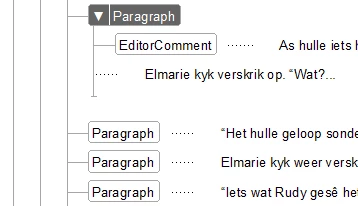
The EditorComment relates to the first Paragraph only, but because of the length of the EditorComments text, it pushes the text below the Paragraph beginning with "Iets wat Rudi gesê..." down the page.


Is there a way to have the text in the side heads rotated vertically instead? The EditorComment is specific to the Paragraph, and can appear anywhere (and multiple times) on the page, so having a text frame on the page isn't practical. I tried insertig it inside a Table, but can't seem to find a way to set the Cell Rotation, and when I manually rotate the cell, it automatically changes width to match the text, rather than the text wrapping.
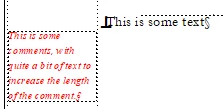
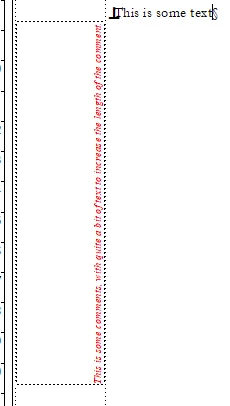
Any suggestions? Or is it simply not possible?

    Correct answer Barb Binder

    Hi @QuintinSeegers_Personal:


    I don't use structured FrameMaker but in terms of the layout... if you want to use a rotated table cell, you could add manual line breaks (Shift+Enter) so that Fm will automatically shorten the cell height, or if you want to use an anchored text frame you could rotate the frame (Graphics > Rotate) and adjust the size manually. 


    But we can't rotate paragraphs within a text flow.


    ~Barb

    2 replies

    Barb Binder
    Community Expert
    Community Expert
    June 15, 2025

    That's a excellent choice, Quintin!


    ~Barb

    ~Barb at Rocky Mountain Training
    Barb Binder
    Community Expert
    Barb BinderCommunity ExpertCorrect answer
    Community Expert
    June 14, 2025

    Hi @QuintinSeegers_Personal:


    I don't use structured FrameMaker but in terms of the layout... if you want to use a rotated table cell, you could add manual line breaks (Shift+Enter) so that Fm will automatically shorten the cell height, or if you want to use an anchored text frame you could rotate the frame (Graphics > Rotate) and adjust the size manually. 


    But we can't rotate paragraphs within a text flow.


    ~Barb

    ~Barb at Rocky Mountain Training
    Inspiring
    June 14, 2025

    Hi @Barb Binder ,


    Thanks for the suggestions. In the end I opted to add them as footnotes instead of notes in the side heads.


    ~Quintin