

Inspiring
October 22, 2023
Answered

Rotated heading jumbled after creating PDF

  • October 22, 2023
  • 1 reply
  • 480 views

Hello. I have a situation where the text of a heading looks fine in FM but gets all jumbled when a PDF is made from it.  This is the section heading for a table, and the table heading itself doesn't misbehave—it's only the section heading. The numbering parameter is H:<$chapnum>.<n>.<n+>\t< =0>< =0>< =0>< >< > which works fine everywhere else in the book. 
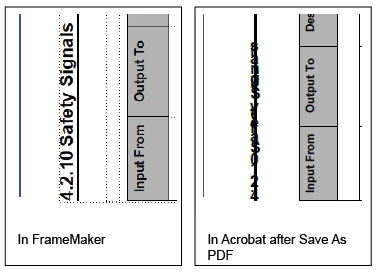
Any and all help will be greatly appreciated. I have spet three days trying to get this PDF ready for my boss and guess what... I'm three days late and I have worked all weekend on this. 

    This topic has been closed for replies.
    Correct answer Bob_Niland

    What version of FM?
    Help ▼ About Framemaker…
    Version: 1x.x.x.xxxx

    Goes to whether it would be worthwhile to play with Publish-to-PDF, Print-to-PDF, Print-to-Ps&Distill.

    PDF Job Options would be worth a look too, esp. font handling (and what font is this?).


    There are some last-ditch hacks that might be applied, too.
    If the table can be correctly rendered to PDF all by itself, import that as a PDF object & rotate it.

    1 reply

    Bob_Niland
    Community Expert
    Bob_NilandCommunity ExpertCorrect answer
    Community Expert
    October 22, 2023

    What version of FM?
    Help ▼ About Framemaker…
    Version: 1x.x.x.xxxx

    Goes to whether it would be worthwhile to play with Publish-to-PDF, Print-to-PDF, Print-to-Ps&Distill.

    PDF Job Options would be worth a look too, esp. font handling (and what font is this?).


    There are some last-ditch hacks that might be applied, too.
    If the table can be correctly rendered to PDF all by itself, import that as a PDF object & rotate it.

    TCBillAuthor
    Inspiring
    October 23, 2023

    Hi Bob, thanks for the quick response.
    My bad, sorry. It's FM version 17.0.2.431. The font is boring old Arial.
    I've tried all the PDF-creation methods you mentioned above. The only thing that worked was Print-to-PDF, which is fine for generating a review copy of the PDF but not so good for actual distribution to customers because all the hyperlinks within the book are broken. I am not wanting to go through and recreate those cross-references by hand!

    TCBillAuthor
    Inspiring
    October 23, 2023

    Actually, I told you wrong. What eventually worked was publish to PS and then a run through Distiller. Print-to-PDF didn't work, the text was still goofed up. I've been trying so hard for so long with this document and its issues (and there are others) that my elation at getting any kind of PDF out of it got me carried away.