



K.Daube
Community Expert
Community Expert
May 1, 2020 7:45 AM UTC
Answered

RTL support damaged in FM-15 and FM-14?

I wanted to describe the set up for pargraphs with automatic numbering in Hebrew (Keep in mind: I can not read/understand Hebrew), it is just my example of RTL language.


I have a paragraph containing the Hebrew text wihich reads from right to left and want to have it adjusted correctly (on the right marginI. The I wanted it to have an indent of 1cm for automatic numbering.

  • As long as the direction is LTR the layout is OK, but for Hebrew text the numbering should be on the right side, where the reading starts.
  • As soon as I change the direction from LTR to RTL the text mostly disappears behind the right side of the text frame...

So I set up the whole thing in FM-13 (2015) which introduced RTL support. Here I can get what I expect:
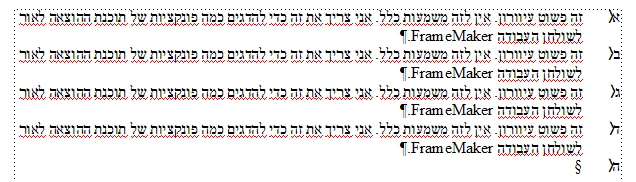
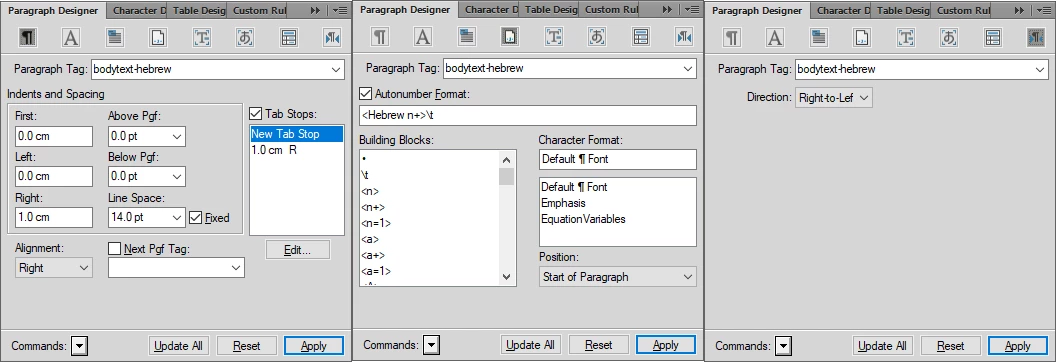
But when importing the file into FM-14.0.4.512 or FM 15.0.5.838 most of the text disappears into the area right to the text frame:
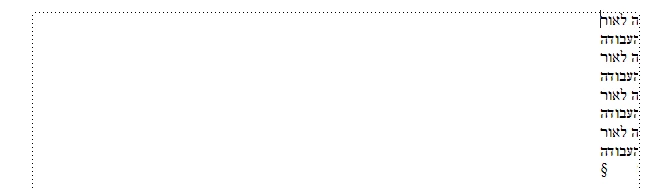

The FM-13 file can be found here.

Since I have other strange effects in my current FM-15 (see Thesaurus) I ask you to verify this behaviour (although I only recently re-installed the latest FM-15).

Thanks for Your help.

Klaus

This topic is closed to new replies. Start a new post to keep the conversation going.
K.Daube
K.DaubeCorrect answer
Community Expert
May 5, 2020 6:56 PM UTC

The outcome of this day is positive, although it was difficult to find what causes this problem and the other one (thesaurus):

  • Check the differences in WIn updates - the one that exists only on my system can not be removed, because it is not listed in the in installed updates...
  • Compaare the .NET versions: on Inge's machine is only .NET 4.8, on mine there are in addition 3.5 SP1, 3.0 SP2, 2.0 SP2
  • Compare the Visual C++ redistributables: remove on my system older levels of the 2013 version; replace the 2017 version by the 2015-2019 version
  • Uninstall and re-install FM-14 and FM-15
  • They work both in their native installations, so I try to successively restore to my standard settings.
  • FM-14 has no problem with my StartUp items and ETB → this works as expected, problem solved here.


For FM-15 i'm careful and start with the standard maker.ini as it is from the fresh installation.

  • ETB and plug-ins do not re-create the problems, but as soon as I just use my old maker.ini things don't work any more.
  • So I walk through the maker.ini settings until I find the culprit:


; The follwoing setting ruins the RTL function
; ForceAsianLayout=On
SwitchToAsianLayoutDialog=On​

ForceAsianLayout must not exist (not be set) hence I commented it out


  • and now can go the drawer and take a drink!


3 replies

K.Daube
Community Expert
K.DaubeCommunity ExpertAuthor
Community Expert
May 4, 2020 3:14 PM UTC

Findings

I installed FM-15.0.5.838 on the Wind10 machine of my wife - which is a plain vanilla installation - and the problem I have on my machine does not occur! Hence FM is definitely not the cause of the problem.

Although both machines have exactly the same Win10-status (OSbuild 10.0.18363.778) there is one noticable difference:

My machine has these directories: C:\Program Files (x86)\Common Files\Adobe\Linguistics and %AppData%\Adobe\Linguistics

Inge's machine: no such directory

I really don't understand why these directories exist - the very same content can be found in each of my FM installation starting with FM-12:  $HOME\FMxx\fminit\Linguistics

→ Renaming these Linguistics to !_Linguistics did not make any difference for the problem.


So a mor elaborate search for the culprit on my system starts ...

Translate
Community Expert
May 5, 2020 8:10 AM UTC

Hi Klaus,


I have FM 15.0.5.838, and I have these directories:

c:\Users\<MyUserName>\AppData\Roaming\Adobe\Linguistics\

c:\Program Files (x86)\Common Files\Adobe\Acrobat\DC\Linguistics\


Not exactly your directories.


Best regards


Winfried


Translate
K.Daube
Community Expert
K.DaubeCommunity ExpertAuthorCorrect answer
Community Expert
May 5, 2020 6:56 PM UTC

The outcome of this day is positive, although it was difficult to find what causes this problem and the other one (thesaurus):

  • Check the differences in WIn updates - the one that exists only on my system can not be removed, because it is not listed in the in installed updates...
  • Compaare the .NET versions: on Inge's machine is only .NET 4.8, on mine there are in addition 3.5 SP1, 3.0 SP2, 2.0 SP2
  • Compare the Visual C++ redistributables: remove on my system older levels of the 2013 version; replace the 2017 version by the 2015-2019 version
  • Uninstall and re-install FM-14 and FM-15
  • They work both in their native installations, so I try to successively restore to my standard settings.
  • FM-14 has no problem with my StartUp items and ETB → this works as expected, problem solved here.


For FM-15 i'm careful and start with the standard maker.ini as it is from the fresh installation.

  • ETB and plug-ins do not re-create the problems, but as soon as I just use my old maker.ini things don't work any more.
  • So I walk through the maker.ini settings until I find the culprit:


; The follwoing setting ruins the RTL function
; ForceAsianLayout=On
SwitchToAsianLayoutDialog=On​

ForceAsianLayout must not exist (not be set) hence I commented it out


  • and now can go the drawer and take a drink!


Translate