

Community Expert
September 30, 2020
Question

Run around properties confusing in FrameMaker 2020
  • September 30, 2020
  • 2 replies
  • 463 views

I am probably overlooking something really obvious here, but I can not make this work:

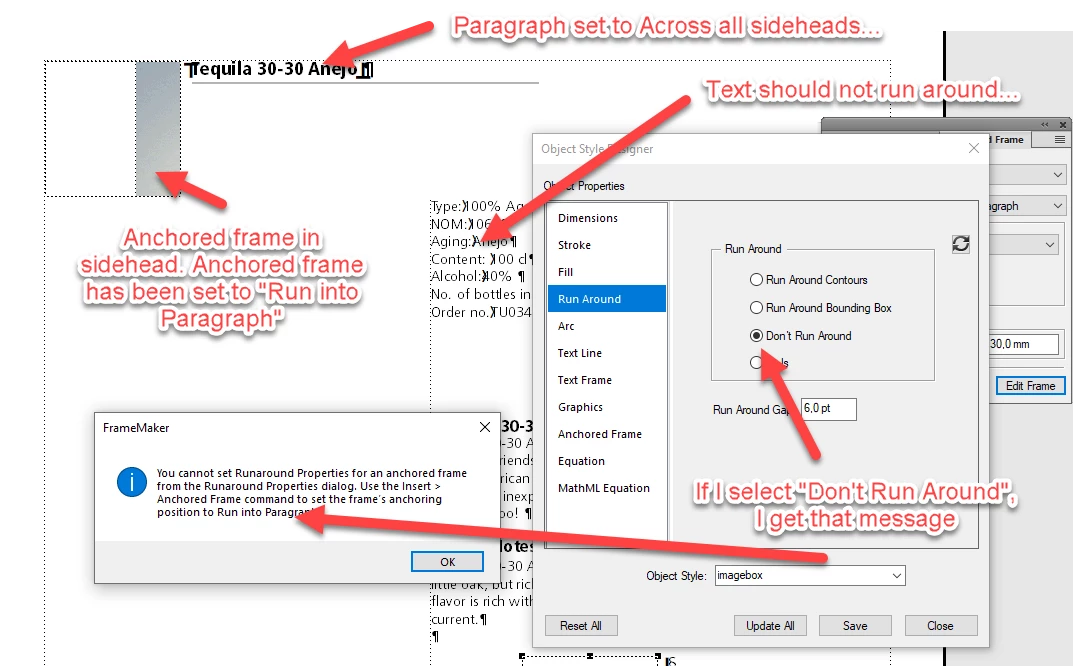
  • I have a page layout with sidehead.
  • I put a headline, which has been set to Across all columns and sidehead (The one saying "Tequila 30-30")
  • I insert an anchored frame in the headline which has been set to "Run into Paragraph"
  • Now I would like to set the anchored frames Run Around Properties to "Don't Run Around". But I get a non sensical error message (Shown above). I want the body text to flow up under the headline. But I can not make that work. But why not, actually?...
This topic has been closed for replies.

2 replies

Barb Binder
Community Expert
Community Expert
September 30, 2020

Hi Bjørn:


Is the anchored frame always the same size? If so, how about adding a left/first indent to the Heading para to accomodate the frame width, and changing the anchored frame to Outside Column with specific (negative) position values?


Para Designer:

Anchored frame:


~Barb 

~Barb at Rocky Mountain Training
frameexpert
Community Expert
Community Expert
September 30, 2020

Run around properties only work for unanchored graphic objects.

Bob_Niland
Community Expert
Community Expert
September 30, 2020

re: Run around properties only work for unanchored graphic objects.

And yes, that makes the feature mostly irrelevant.

  • RA is OK for master page graphics. And for limited numbers of graphics, a unique MP with the graphic could be mapped to the associated/triggering body text content that needs it.
  • RA also works if the associated text is in a text frame in the anchored frame.
  • But the obvious solution of just dropping the graphic on the page, is usually a stewardship problem, as reflow of content can move the associated text to another page all too easily. OK for 1&2-page docs, I suppose.