
Run ExtendScript down a column on a table
I am putting together a script to align numbers in a table by decimal/assumed decimals. (I think all of the parts I’ve found here on the forum – what a great resource!)
FrameMaker aligns like this:
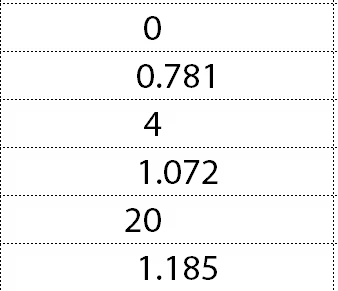
We'd like it to align like this:
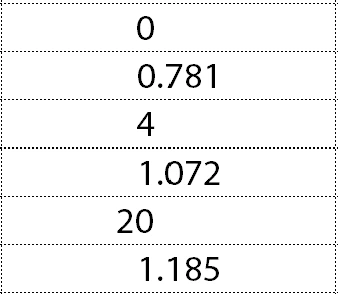
My script adds “.0” and changes the character style to white. (I got help with that part last week but the post got lost in the Adobe forum conversion.) That part works, but I can’t get it to do more than one cell. We can't run it on all tables in the document, or even a whole table. It will need to be by column. Right now, I'm thinking to put the cursor in the top cell of the column, then run the script. Here’s what I have.
#target framemaker

var doc, pgf, cell, regex;

//given the cell containing the insertion point
doc = app.ActiveDoc;
pgf = doc.TextSelection.beg.obj;
cell = pgf.InTextObj;
regex = /\./; // this finds a decimal

// ...navigate down the column.
while (cell.ObjectValid () === 1) {  //I think this is where it breaks down
  processDec (pgf, doc, regex);
  cell = cell.CellBelowInCol;
}
// From here down it works great, on one cell.
function processDec (pgf, doc, regex) {  //by FrameExpert
    var end = Constants.FV_OBJ_END_OFFSET - 1, begin = 0, textRange;
    var textList = pgf.GetText (Constants.FTI_CharPropsChange);

    for (var i = textList.length - 1; i >= 0; i -= 1) {
        begin = textList[i].offset;
        if (begin !== end) {
            textRange = new TextRange (new TextLoc (pgf, begin), new TextLoc (pgf, end));
                if (regex.test (getText (textRange, doc)) === false) {  // if there is a decimal, nothing happens

                    addDecimal ();
                }
            end = begin;
        }
    }
    if (end > 0) {
        textRange = new TextRange (new TextLoc (pgf,0), new TextLoc (pgf,end));

            if (regex.test (getText (textRange, doc)) === false) {  // if there is a decimal, nothing happens
                addDecimal ();
            }
    }
}

function getText (textObj, doc) {  //by FrameExpert

    var text = "", textItems, i;

    if (textObj.constructor.name !== "TextRange") {
        textItems = textObj.GetText(Constants.FTI_String);
    } else {
         textItems = doc.GetTextForRange(textObj, Constants.FTI_String);
    }
    for (i = 0; i < textItems.len; i += 1) {
        text += (textItems[i].sdata);
    }
    return text;
}

function addDecimal () {

var textRange = new TextRange;
    textRange.beg.obj = textRange.end.obj = pgf;
    textRange.beg.offset = 0;
    textRange.end.offset = Constants.FV_OBJ_END_OFFSET - 1;

    doc.TextSelection = textRange;
    textRange = doc.TextSelection;

    doc.AddText(textRange.end, ".0");

    addWhite (); //calls function to apply the White character format to the .0
  }

function addWhite () {

var textRange = new TextRange;
    textRange.beg.obj = textRange.end.obj = pgf;
    textRange.beg.offset = Constants.FV_OBJ_END_OFFSET - 3;
    textRange.end.offset = Constants.FV_OBJ_END_OFFSET - 1;
    applyCharFmt (textRange, "White", doc);
}

function applyCharFmt (textRange, name, doc) {
    var charFmt = 0;
    charFmt = doc.GetNamedCharFmt (name);
    if (charFmt.ObjectValid()) {
        doc.SetTextProps (textRange, charFmt.GetProps());
    }
}
If it's possible, I'd like it if we could run it on multiple selected columns. Can anyone help me fix this?
Thank you.


 AdChoices