MR89
Inspiring
February 28, 2018
Answered

Run-in Paragraph?

  • February 28, 2018
  • 2 replies
  • 1085 views

I have a run-in paragraph tagged (highlighted below), but how do I get it back on the same line as my previous bold heading?  When I delete a space to bring it back up, the tag changes back to the previous bold heading's tag:

    This topic has been closed for replies.
    Correct answer Ian Proudfoot

    I tried it with FrameMaker 2017. This seems to work for me. Here are the results:

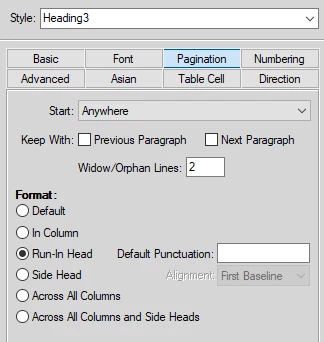
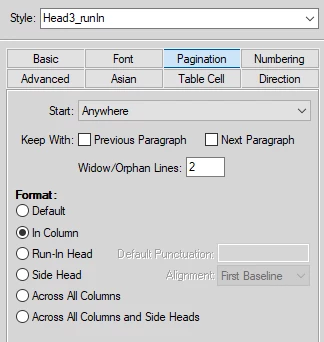
    To achieve that I set the Paragraph formats as follows:

    I added a space character in the Default Punctuation to separate the two paragraphs.

    Here the second paragraph is In Column, so the name of Head3_runIn is a little misleading.

    Now if you are doing exactly the same as me but getting different results, we will need to establish what is going wrong.

    Ian

    2 replies

    Barb Binder
    Community Expert
    Community Expert
    February 28, 2018

    Hi MR89:

    I agree with Ian that you just have the paragraph formats backwards. If it is helpful, you can create a new default portrait document and add two lines of text.

    By default, all paragraphs are initially assigned the Body tag, and are set to In Column.

    In addition to Heading1 and Heading2, the Paragraph Catalog in a new file has a third sample heading tag called HeadingRunIn. When assigned to a heading, instead of sitting above the paragraph it modifies, it allows the paragraph underneath to come up and sit on the same line.

    Once you understand the logic, it should be easy to update your document to work the same way.

    ~Barb

    ~Barb at Rocky Mountain Training
    Ian Proudfoot
    Legend
    February 28, 2018

    The run-in paragraph should be the first paragraph, not the one highlighted in yellow.

    Ian

    MR89
    MR89Author
    Inspiring
    February 28, 2018

    I apply the first part with my paragraph tag (Heading3) and set it as a "Run-in" in the Pagination tab of the Paragraph Designer, but when I set the second part of the paragraph as "In Column" with my paragraph tag (Head3_runIn), it changes the first part to "In Column" and with (Head3_runIn) also.

    I'm sure I'm missing something or doing this in the wrong order.

    Ian Proudfoot
    Ian ProudfootCorrect answer
    Legend
    February 28, 2018

    I tried it with FrameMaker 2017. This seems to work for me. Here are the results:

    To achieve that I set the Paragraph formats as follows:

    I added a space character in the Default Punctuation to separate the two paragraphs.

    Here the second paragraph is In Column, so the name of Head3_runIn is a little misleading.

    Now if you are doing exactly the same as me but getting different results, we will need to establish what is going wrong.

    Ian