
Inspiring
October 3, 2023
Answered

Save as PDF - fail

  • October 3, 2023
  • 1 reply
  • 1611 views

Hello,

I have the problem with saving as PDF.

When I save the opened document to the PDF for the first time everything works.

When I try to save the opened document to the PDF for the second time, I get this message.
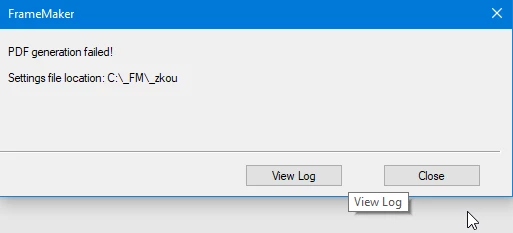
At this moment I have only this crazy solution: to close Adobe Framemaker, to open again and save again).

Reinstalling of Framemaker didn´t help..


I am using this Settings.sts https://1drv.ms/u/s!AmJ2x72bqA9dhSo6X2FOm20xBM18?e=gxgJfY


Thanks for advices


Adam

    This topic has been closed for replies.
    Correct answer Adam – CMENG

    As the solution seems to be found my posting isn't relevant anymore.


    Hi, Adam ( @Adam – CMENG  ),

    you have installed Adobe Acrobat, Distiller and the "Adobe PDF" printer?

    Maybe your problem is in the settings of the Adobe PDF printer.


    You can make a test: Open a FM-doc and then go to "Print...", change the printer to "Adobe PDF" and print.

    Does that work?

    Or do you get an error-message?

    Regards

    Stephan


    This method with printing to Adobe PDF is OK.

    Problem is solved now. The problem was in folder name with diacritics.

    1 reply

    Jeff_Coatsworth
    Community Expert
    Community Expert
    October 3, 2023

    What exact version of FM are you using? I take it you're using Save As PDF? Have you tried Publishing as PDF or print to the Adobe PDF printer instance?

    Inspiring
    October 3, 2023

    I am using version 17.0.2 .

    If I do it via Publishing it works correctly even if I repeat.

    But if I do Save as PDF and then try to publish I get this message:

    So Publishing works repeatedly but not Saving as PDF.

    I need to work it correctly...

    Jeff_Coatsworth
    Community Expert
    Community Expert
    October 3, 2023

    Save As and Publish to PDF both use the same mechanism now in FM2022, so I would expect them both to exhibit the same issue - that they don't is curious. Have you checked the log file to see what's going on? Do you have any Console message appearing as it's running? Did you make any changes to the default settings file?