
jayaflir
Inspiring
September 2, 2018
Answered

Saving as PDF not working

  • September 2, 2018
  • 1 reply
  • 5108 views

I am using FM 2017 on a trial basis to prepare a single-chapter document (that is, not a book). When I try to save as PDF, the Save Document dialog appears and I select how and where to save the PDF. Then, the PDF Setup dialog appears. When I click either Set or Cancel, FM does not save the document as a PDF.

Any help would be appreciated.
This topic has been closed for replies.
Correct answer saurabhatadobe

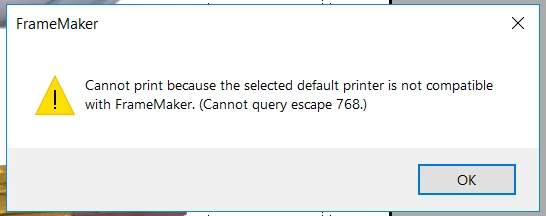
Found the Adobe PDF printer, but that didn't work either:


Please update your Windows 10 with latest update from Microsoft. This issue has been fixed.

1 reply

Barb Binder
Community Expert
Community Expert
September 2, 2018

Hi Jay:

Try File > Print with Print to File off, Generate Acrobat Data on and Printer: Adobe PDF.

~Barb

~Barb at Rocky Mountain Training
jayaflir
jayaflirAuthor
Inspiring
September 3, 2018

Thank you, Barb, but if you notice that, while similar, you have attached a screenshot of the Print Document dialog. That dialog does not appear when I try to Save as PDF. After I select a file name and location, the PDF Setup dialog appears:

I do notice that you are printing to Adobe PDF printer. I don't have that option, so maybe I'll look into it. BTW I can print to PDF using the Microsoft Print to PDF printer, but it doesn't offer the exact size of this particular document.

Thanks, again.

jayaflir
jayaflirAuthor
Inspiring
September 3, 2018

Found the Adobe PDF printer, but that didn't work either: