Known Participant
January 5, 2021
Answered

Saving to PDF from FrameMaker 2019 is deadly SLOW - 10 secs per page average

  • January 5, 2021
  • 7 replies
  • 1575 views

When saving a FrameMaker 2019 book to PDF (Acrobat Pro DC installed), the Acrobat Distiller process takes anywhere from 8-12 seconds per page to process. For a 100 page book, that's over 16 minutes, which is several times slower than it used to be. What is causing this? I maintain my computer regularly and no other applications are behaving this way. Any suggestions?

Correct answer Barb Binder

Hi @en71557408:


Every application has a preferred way to create PDFs, and usually several other options. In FrameMaker 2019, the preferred technique is to use either use File > Save as PDF or use File > Publish and "generate" the PDF from the Publish pod. File > Save as PDF simply uses the last settings from the Publish pod, so if you need to edit or even just check the export settings, you have to open the Publish pod, and while you are there, you may as well just stay there to complete the process. These use the new engine that Jeff referred to.


Neither of those options (again, they are really the same option) uses Distiller as a default. Distiller is still available for those who have determined that they need it, but it is no longer recommended. Is the Use Acrobat Distiller checkbox enabled in the PDF Settings dialog box? Does disabling it make a difference? (Click the Edit button in my screenshot, below.)


If that doesn't help, you might trying creating a new .sts file (maybe the old one is now corrupt?). Click the Change Settings button > New. FrameMaker stores the default.sts file in c:\Program Files\Adobe\Adobe FrameMaker 2019\fminit\Publisher. You can save the new one there with a different name (or really anywhere else where you can find it when you need to reference it). 


Once you have created a new .sts file, click the Generate Selected Output button and let us know if the normal speed has returned.
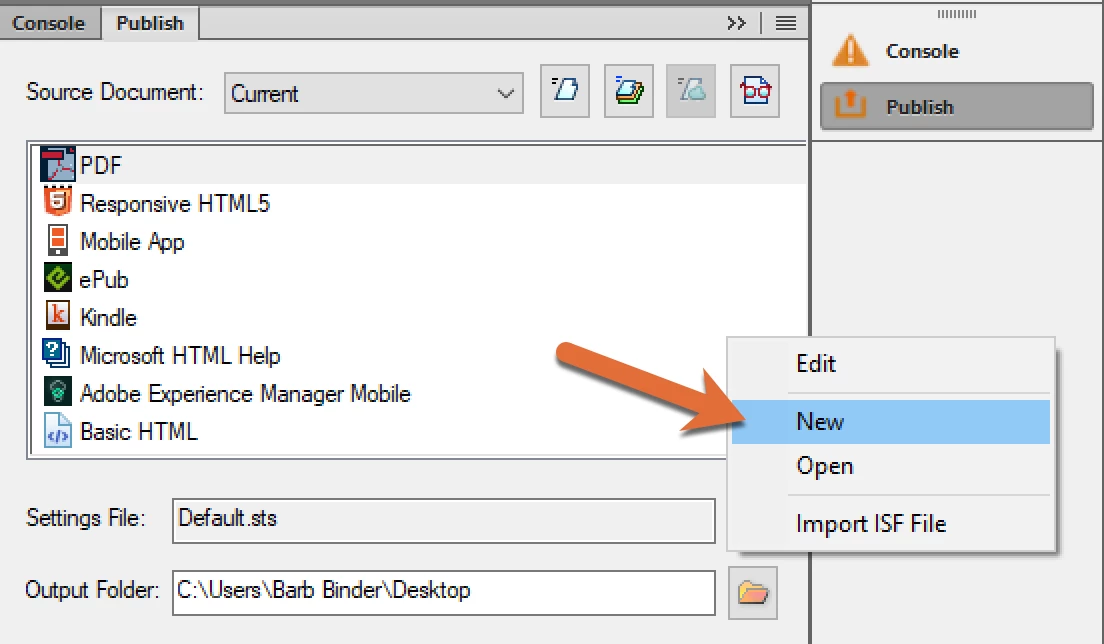
If that still doesn't work, you might consider a uninstall/reinstall, or better yet, first, try resetting preferences. https://www.rockymountaintraining.com/adobe-framemaker-resetting-preferences/


~Barb 



7 replies

Community Expert
April 3, 2025

I want to add that in some situations going via Distiller can be slow for us as well, with no explanation of why. 15 min to export a PDF for some documents.


But it's unfortunately the best and most reliable way to export PDFs from FrameMaker even now in 2025. The "new" built-in method is too unreliable/buggy. We seriously tried to use the new method, but had to abandon it.


But even with the option to use distiller ticked you have to be aware of many shortcomings, like fonts that fail to work  (like Myriad Pro Bold) depending on what default printer you have set, etc.

PDF export in FM feels like it's still 20 years behind InDesign, and the PDF export results depending on the zoom level in the app (!), FM messing up colors (it's vitally important that it never converts anything), ignoring the JPEG quality settings of the chosen preset, sometimes the entire document exporting ~1 inch tall - and you have to restart FM for it to export with the correct page size again, linking PSD images making the export extremely slow (file size isn't the issue as an equally large tiff is fast), etc.  It's really bad and not predictable without just brute-forcing every combination of settings to find the least crap one.


Maybe I'm just spoiled from having used InDesign – where export to PDF is super fast, and you get predictable and reliable results every time, with proper color handling as well. 😞

Known Participant
January 6, 2021

Thank you, Barb! You're brilliant!

The problem was indeed that the "Use Acrobat Distiller..." option was selected in the Publish Settings. If that's not a default setting, I must have changed it at some point not realizing that it would affect the Save as PDF command in the File menu. I deselected the option and tried again. It didn't work at first, but after restarting FrameMaker, the change took effect and I'm back to a normal printing speed.

This eexperience is a good example of how the plethora of settings distributed across many dialogs in Frame, Acrobat, and Windows can be confusing to all but the most experienced users.

In any case, many thanks for helping me to fix this vexing problem.

Barb Binder
Community Expert
Barb BinderCommunity ExpertCorrect answer
Community Expert
January 6, 2021

Hi @en71557408:


Every application has a preferred way to create PDFs, and usually several other options. In FrameMaker 2019, the preferred technique is to use either use File > Save as PDF or use File > Publish and "generate" the PDF from the Publish pod. File > Save as PDF simply uses the last settings from the Publish pod, so if you need to edit or even just check the export settings, you have to open the Publish pod, and while you are there, you may as well just stay there to complete the process. These use the new engine that Jeff referred to.


Neither of those options (again, they are really the same option) uses Distiller as a default. Distiller is still available for those who have determined that they need it, but it is no longer recommended. Is the Use Acrobat Distiller checkbox enabled in the PDF Settings dialog box? Does disabling it make a difference? (Click the Edit button in my screenshot, below.)


If that doesn't help, you might trying creating a new .sts file (maybe the old one is now corrupt?). Click the Change Settings button > New. FrameMaker stores the default.sts file in c:\Program Files\Adobe\Adobe FrameMaker 2019\fminit\Publisher. You can save the new one there with a different name (or really anywhere else where you can find it when you need to reference it). 


Once you have created a new .sts file, click the Generate Selected Output button and let us know if the normal speed has returned.

If that still doesn't work, you might consider a uninstall/reinstall, or better yet, first, try resetting preferences. https://www.rockymountaintraining.com/adobe-framemaker-resetting-preferences/


~Barb 



~Barb at Rocky Mountain Training
LinSims
Community Expert
Community Expert
January 6, 2021

I'm still using Distiller because the font I use in my documentation will sometimes not convert correctly to PDF. It has all sorts of spacing issues. This is a bug that Adobe developers are working on solving, but for now, I have to deal with a slow process when I go to final.

Known Participant
January 6, 2021

That's good to know. Thank you!

Jeff_Coatsworth
Community Expert
Community Expert
January 5, 2021

I think what Dov is talking about is the newer Publish feature - it uses a completely new engine to create PDFs.

Known Participant
January 5, 2021

If that's the case, I'm afraid I see no improvement. I'm averaging about 10 seconds per page, whereas a few weeks ago it was more like 1-2 pages per second, if not faster.

Dov Isaacs
Legend
January 5, 2021

Why don't you use the direct PDF export from FrameMaker? That avoids the antique FrameMaker=>PostScript=>PDF shuffle via Distiller!


- Dov Isaacs, former Adobe Principal Scientist (April 30, 1990 - May 30, 2021)
Known Participant
January 5, 2021

That sounds intriguing. I had not heard of "PDF export" before and spent some time trying to find out about it in various sources, including the online help. No results. Would you mind explaining how to do that or is the feature known by some other name?


Incidentally, the FM 2019 documentation recommends the File > Save as PDF method, which is what I've been using successfully up until a few weeks ago. Something has changed. My computer seems to be functioning normally other than being able to save FM books to PDF in a reasonable amount of time. Yesterday, one of the larger books I was working with took about two hours to convert to PDF. I tried everything I could think of, including rebooting Windows and checking for viruses, but nothing helped. 

Jeff_Coatsworth
Community Expert
Community Expert
January 5, 2021

What point version of FM are you running? Are you all patched up? Check Help > Updates to check. Have you tried the other PDF methods? (Print Adobe PDF printer instance/Publish pod to PDF output)

Known Participant
January 5, 2021

Yes, I have the latest version: 15.0.7.973. This is a recent development, so perhaps there's something going on in that release.


I have tried four methods: Publish pod to PDF outputm, File > Save as PDF, Print Book to .ps, and Print Book to PDF. All are extremely slow. 


Bob_Niland
Community Expert
Community Expert
January 6, 2021

On the path Print-to-.ps and separately Distill, which is the slow phase?

Are imported objects all local to the machine?

Karl Heinz  Kremer
Community Expert
Community Expert
January 5, 2021

I've moved your post to the FrameMaker community. There is a better chance that somebody knows what's going on. 

Known Participant
January 5, 2021

Thank you, Karl!