Participant
April 10, 2024
Answered

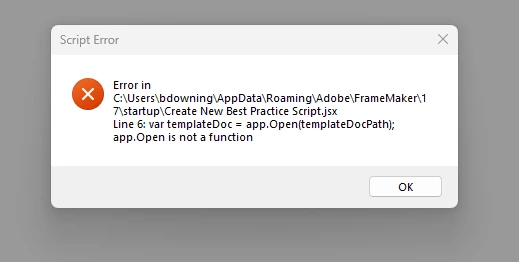
Script Error: Open is not a function

I get this script error every time I open Frammaker. It doesn't seem to affect anything, but how can I eleminate it?

 

    This topic is closed to new replies. Start a new post to keep the conversation going.
    frameexpert
    frameexpertCorrect answer
    Community Expert
    April 10, 2024

    There is a script, C:\Users\bdowning\AppData\Roaming\Adobe\FrameMaker\17\startup\Create New Best Practice Script.jsx, that is running when you start FrameMaker. Remove that script from the startup folder and the error will be eliminated.

    www.frameexpert.com

    2 replies

    frameexpert
    Community Expert
    frameexpertCommunity ExpertCorrect answer
    Community Expert
    April 10, 2024

    There is a script, C:\Users\bdowning\AppData\Roaming\Adobe\FrameMaker\17\startup\Create New Best Practice Script.jsx, that is running when you start FrameMaker. Remove that script from the startup folder and the error will be eliminated.

    Translate
    www.frameexpert.com
    Participant
    April 10, 2024

    Great! Found them (there was another there) deleated and now error is gone. Thank you!

    Translate
