
Inspiring
July 19, 2024
Question

SCRIPT FOR TEXT INSETS TO LINK AUTOMATICALLY FRAMEMAKER

  • July 19, 2024
  • 3 replies
  • 638 views

Hi Folks, Im trying to streamline out in house processes and have concluded (with the help of this community) that automating some of our basic steps would be the way to go. Below is the process when we get our files back from the translation company of the part i think we can improve on.

Now the issue is i need a script to relink text insets to updated files, currently i have to point it in the direction of the folder for say 'Hydraulic Pin adjustment.fm' and relink it to the relevant language like this 'Hydraulic Pin adjustment_ES.fm' and so on with each language. If i could just singly click a link to connect that to the correct path&file name that would be a huge time saver for us. Currently im selecting through the folder structure, which when added up for multiple insets & multiple languages, takes some time.

Similarly with our cross references, currently would say '(See hydraulic pin adjustment)'  need to have the word updated, so 'See' is replaced by 'Consulte' followed by the translation for the hydraulic pin adjustment chapter. Currently im editing the cross reference format, to add 'consulte' and then have to relink it to the correct paragraph too. What makes this worse is that when you hit this (below), it doesnt update it in the entire book, only the chapter your on.
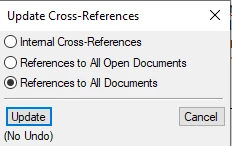
We do use a reference template for each language where we import character and paragraph formats so im wondering if something could be added to it?

It feels like an outdated, manual, time consuming and repetitive process so i feel like there must be another way. Any help would be much appreciated, thanks!


    This topic has been closed for replies.

    3 replies

    Community Expert
    July 19, 2024

    Have you tried using the  FrameMakers built-in XLIFF tool? I believe that would make the linking process superfluos.

    Bjørn Smalbro - FrameMaker.dk
    Robbie.NAuthor
    Inspiring
    July 19, 2024

    No , I havent...from a quick google am i correct in thinking that negates the need for text insets as it just translates the contents of the book as they are in english? I think our translation company prefers files in that format.

    Community Expert
    July 19, 2024

    When you run the XLIFF export process on the book level or single chapter level, it will bundle everything into an xml structure. All texts will be separate from their formatting. The translation agency can handle XLIFF in their translation tools. They can send you XLIFF back, which you can import into  you publication an all texts will have been translated in their proper place.  You may need to rework your workflow a wee bit, but I have found XLIFF to be a fine way of handling translations without the need to resave and relink from MIF

    Bjørn Smalbro - FrameMaker.dk
    frameexpert
    Community Expert
    Community Expert
    July 19, 2024

    This is a common use-case for FrameMaker environments so I wrote an ExtendScript script particularly for this. See my PathChanger script:

    http://www.frameexpert.com/store/

    Legend
    July 19, 2024

    Hi Robbie.N, this sounds like a classic case for automation. It is a simple, repetitive, and predictable task that is taking up lots of manual time that could be handled in seconds with a reasonably simple script. So I commend you for recognizing that. However, when you ask for help, I'm not sure what "help" means. If "help" means that you want somebody to write the script for free, I think that is more help than you can reasonably ask for here. If you are looking for someone to pay, there are several of us here with scripting knowledge that could consider the job, but I suspect that is not what you mean by help.


    If you are looking to do this in-house without contractor costs, you will need to learn how to write ExtendScript or FDK code, with the former probably being the most appropriate and accessible. While nobody here could lead you by the hand in this effort, I can help you by directing you to these samples:


    http://weststreetconsulting.com/WSC_ExtendScriptSamples.htm


    They are designed for the complete beginner and while they do not serve the precise need that you are looking for, they should help you understand how FrameMaker scripting works such that you can begin to write your script on your own. Then, if you have specific, focused questions along the way, this forum is a good place to ask for help with those.


    It sounds like a great project and I hope you see it through.


    Russ

    Robbie.NAuthor
    Inspiring
    July 19, 2024

    Hi Russ, thanks for the response. When i said help, i was just looking to be pointed in the right direction. I guess im going to have to look into this extendscript and weigh up weather or not its worth learning, or just paying someone to write the code (I have a feeling the latter would be less timeconsuming and painfull!).  Does anyone in this community have any interest in such a project? I feel that if an expert looked at our methodology theres probably more areas for improvment than i mentioned above!

    Regards,
    Rob

    Jeff_Coatsworth
    Community Expert
    Community Expert
    July 19, 2024

    There's also @frameexpert too.