
Script not working, now that table header row is one, not two rows.
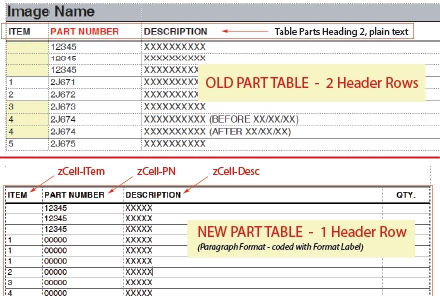
I updated an old template, with an old script. To make it more effienct (constant cut and paste) I removed a header row and programmed the new header with Paragraph Formatting. Now the script no longer works.
If I read this correctly, the script identifies the table as a "Parts Table" and then runs the "Remove Rulings" script, and then runs the "Add Rulings" script, placing lines where they need to be. But it is broken, because it is not identifing the tables as a parts table or does not find the text "Part".
// script in question:
function main() //Removes ruling and adds
{
for (var q =0; q < textItems.len; q++)
{
table = textItems[q].obj;
table.HFSeparatorRuling = blargName2;
table.HFRowRuling = blargName2;
row = table.FirstRowInTbl;
if (row.ObjectValid())
{
topRowCell = row.FirstCellInRow;
cell = topRowCell;
cell = cell.CellBelowInCol;
cell = cell.NextCellInRow;
if(cell.ObjectValid())
{
blarg = cell.GetText(Constants.FTI_String);
dude = ""
if(blarg.len > 0)
{
dude = blarg[0].sdata;
}
if(dude.indexOf("PART") !== -1) //Checks for a Parts Table.
{
Thank you for your help.


 AdChoices