Participant
Aug 25, 2022 11:22 AM UTC
Question

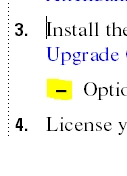
Second level bullets look different in PDF

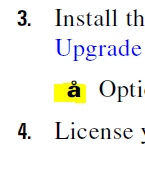
I recently updated my TCS version to 2020. When I edit my documents in FrameMaker, everything looks perfectly normal, but once I generate a PDF, the second level bullets look like å.


I went through similar topics on the forum and saw people suggesting converting the font used for that style from ttf to otf - I have been unable to do that (or I haven't figured out how), and also suggesting setting the colors from RGB to CMYK, but it's already set to CMYK for me.


Any ideas how to resolve this issue?
 

This topic is closed to new replies. Start a new post to keep the conversation going.

8 replies

Dave Creamer of IDEAS
Community Expert
Community Expert
Aug 25, 2022 2:45 PM UTC

Try changing it to an en dash [ \= ] in the numbering tab. Should look about the same.

Translate
David Creamer: Community Expert (ACI and ACE 1995-2023)
Participant
Aug 25, 2022 3:01 PM UTC

Hi David, thanks for the suggestion, but it didn't work. I also tried changing both the font and the format, and no changes, I still get å.

Translate
Bob_Niland
Community Expert
Community Expert
Aug 26, 2022 1:16 AM UTC

You might try saving the document as MIF.
Open in a plain text editor.
Look for the 

<Para

that contains the affected

<String `Option…
see what the

<PgfNumString `\x13 –\t'>
contains. That "–" character would be key. If it's also "å", then this would seem to be an FM problem. Otherwise, it's later in the workflow. I presume you get the same result for Publish-to-PDF, Save-As-PDF, Print-to-PDF, and Print-to-Ps & Distill?

Translate
Bob_Niland
Community Expert
Community Expert
Aug 25, 2022 1:43 PM UTC

What is the font-family for the sub-bullet paragraph format?
What character is the "-"? The embed is a raster image, so I can't guess.


Unicode has a dozen or so codepoints whose glyphs look like a hyphen or dash, and any of them except:
U+002D Hyphen-Minus
could raise font issues.


Now as to why it's {apparently} being rendered as
U+00E5 Latin Small Letter A with Ring Above
is rabbit hole into which it is too early to dive.

Translate
Participant
Aug 25, 2022 3:00 PM UTC

Hi Bob, thanks for the reply!


The font is Times, and I'm not sure which character it is (I'm using a client's template), but if I go to Numbering > Format, it says \sn–\t.


Another commenter suggested I change the format to an en dash, and it looks basically the same in FrameMaker, but when I publish the PDF, it still shows up as å.

Translate
Bob_Niland
Community Expert
Community Expert
Aug 26, 2022 12:00 AM UTC

re: The font is Times…

See what's actually being rendered. Select the bullets from the PDF, and paste them into some code reporting site, such as Unicode code converter. see what U+hex is read back.


Since you've already tried a different font, what's below here probably isn't a productive clue trail.


Times (vs. Times New Roman) was originally a Type 1 font, 8-bit, so had ISO/IEC 8859 glyphs (which do include - & å, but no Unicode) for a couple of decades. Apart from any Unicode issues, Adobe is discontinuing app support for T1 fonts next year, and has already done so in some apps. If found to be T1, it would be worth figuring what vintage of .PFB & .PFM files were used to install it. If the c:\windows\fonts\… files are instead found to be TTF, OTF or something else, check the file size. If under 50Kb or so, it's probably a legacy 8-bit font. BabbleMap can also show you what's in the font.

Translate