I've dabbled with both methods. I think I am honing in on the cause for the issue I am seeing - I will inform once I am sure.
In the meantime. Should pagination settings be applied based upon the content of a page I.e. after you have added all content into the body? For example, a cover page - should it be Single Side - Right?
Another example. A page that has two master pages (different headers), with the body having content that spans 4 pages, should it be set to Double Sided and Right?
regards,
Ben
Hi Ben:
For example, a cover page - should it be Single Side - Right? |
If the book is double-sided, then I would make the cover page double-sided as well. The second page may be a blank left hand page functioning as a placeholder, or books will often use that page for the publication info like the ISBN number, copyright, etc. Pick up a book off of your bookshelf and take a look at it—the page behind the title page is either a blank left or has the publication information. Reports may jump right into content, but books usually do not.
A page that has two master pages (different headers), with the body having content that spans 4 pages, should it be set to Double Sided and Right? |
Let's look at it this way:
- A single-sided document will only have one default master page, and is the correct choice when you plan on only printing on the front of every piece of paper. Any repeating information like running heads and graphic elements will appear on the exact same place on all pages (unless you create custom masters for specific situations).
- A double-sided document will have a default left and right master page. Choose this when you intend to print on both sides of the paper. Having two default masters will allow you to mirror running heads—i.e., the page numbers should always be on the outside edge of a printed publication. You can put the page number on the left side of the left master and the right side of the right master.
- As for the Start On settings, most books begin new chapters on right pages, but I have one client who begins new chapters on the next available page. I set this up via the steps outlined below, but even in that situation, the front matter chapters and the first first chapter begin on a right page, so after setting up the pagination settings for the entire book, I return to the front matter chapters and the first chapter in the body of the book to change them to Right.
Actually, I am wondering why my settings changed after the recompile |
I have not seen this happen—but I have never mixed double-sided and single-sided pagination settings in a single book. The practice I follow is to base all my chapters (including front matter) on my double-sided template, and not worry about pagination settings in the document files.
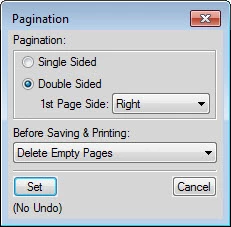
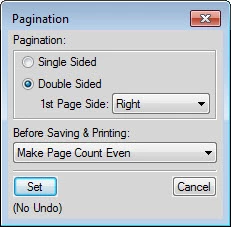
Once my chapters have been added to my book, I click the top chapter in the book window (the title page(s)) and shift click the last chapter, right click over the selection and set the Pagination settings for the entire book. This forces a book update and all the pages fall into the proper settings.
~Barb




 AdChoices