
Participant
October 3, 2024
Question

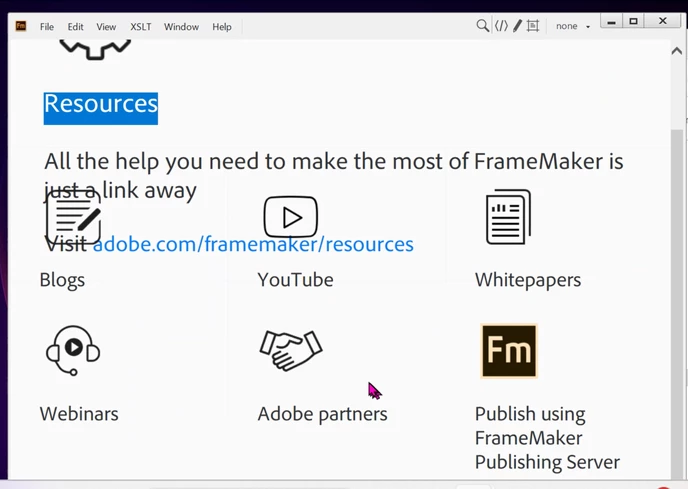
Setting Screen in ADOBE Framemaker - Ver 2019
  • October 3, 2024
  • 3 replies
  • 189 views

How do I fix the resolution so that this displays correctly.   Seems to display correctly than immediately changes to look like this.

We have played with the resolutions setting via the properties under the .exe but nothing worked

thanks in advance. 

    This topic has been closed for replies.

    3 replies

    Barb Binder
    Community Expert
    Community Expert
    October 4, 2024

    What browser(s) do you have installed? FrameMaker used to tie the Welcome screen display to the browser. 


    ~Barb

    ~Barb at Rocky Mountain Training
    Jeff_Coatsworth
    Community Expert
    Community Expert
    October 3, 2024

    What point version of FM2019 are you running? IIRC there was a fix made by FM to correct this messed up home screen.

    Bob_Niland
    Community Expert
    Community Expert
    October 3, 2024

    You might play with scaling in the Windows Display Settings menu. I'm running a 3840×2160 32in display, at 150% scaling, and the FM2019 home screen opens correctly (i.e. mildly annoying, but no content overlaps).

    Note that FM2020 and 2022 have a completely different home screen, with these particular icons in a pod.