Participant
March 23, 2016
Answered

Setting the side head area in FrameMaker 2015

  • March 23, 2016
  • 1 reply
  • 829 views

The Object Properties dialog box has changed considerably in FrameMaker 2015. It looks like you have to specify side heads through the Object Style Designer and then assign that style to the text frame.  Is that true?

So I defined the side heads using Graphics > Object Style Designer. In the Object Properties dialog box, I selected my side head style and clicked Save. The side heads weren't added. Nothing changed on the page.

Does anyone know how to add side heads in FrameMaker 2015?

    This topic has been closed for replies.
    Correct answer Arnis Gubins

    Same as always:

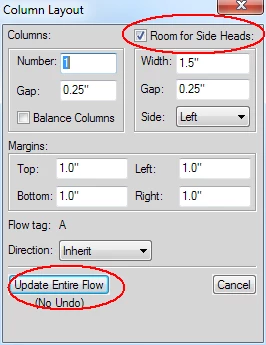
    1) Format > Page Layout > Column Layout...

    2) Click on the Room for Side Heads checkbox in the upper left and fill in the desired Width, Gap and Side properties

    3) Click on Update Entire Flow


    This is an entire document Flow-level property, so you really shouldn't be going through the Object Designer.

    1 reply

    Arnis Gubins
    Arnis GubinsCorrect answer
    Inspiring
    March 23, 2016

    Same as always:

    1) Format > Page Layout > Column Layout...

    2) Click on the Room for Side Heads checkbox in the upper left and fill in the desired Width, Gap and Side properties

    3) Click on Update Entire Flow


    This is an entire document Flow-level property, so you really shouldn't be going through the Object Designer.