QuintinSeegers
Legend
April 29, 2021
Answered

Shortcut for entering elements higher-up in the structure

  • April 29, 2021
  • 2 replies
  • 282 views

I'm busy developing our first EDD.

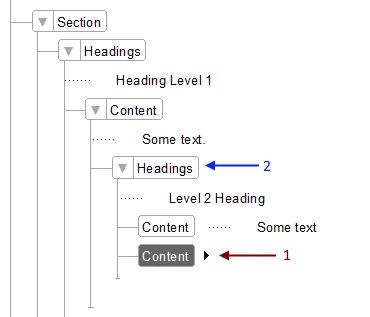
In the above screenshot, where the highlighted Content element is (#1), I want to add another Heading but on the same level as the previous heading (#2). If I select my Headings element, it adds it as a child level heading, having the following result:
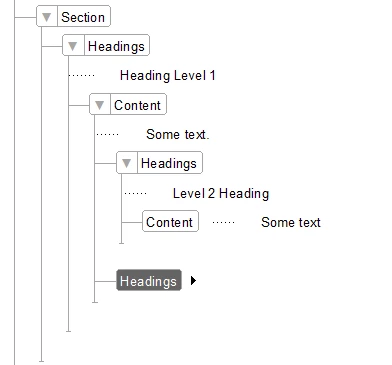
Is there a shortcut to do this, without having to click on the Structure View first?

    This topic has been closed for replies.
    Correct answer Stefan Gentz

    Have a look at the shortcuts for working with structured content:


    https://help.adobe.com/en_US/framemaker/using/index.html#t=using-framemaker%2Fuser-guide%2FWSd817046a44e105e21e63e3d11ab7f7862b-7f6c_ver12.0.html


    If I understand you correctly, ctrl + alt + ↑ and ctrl + alt + ↓ are what you are looking for.

    2 replies

    Stefan GentzCommunity ManagerCorrect answer
    Community Manager
    April 29, 2021

    Have a look at the shortcuts for working with structured content:


    https://help.adobe.com/en_US/framemaker/using/index.html#t=using-framemaker%2Fuser-guide%2FWSd817046a44e105e21e63e3d11ab7f7862b-7f6c_ver12.0.html


    If I understand you correctly, ctrl + alt + ↑ and ctrl + alt + ↓ are what you are looking for.

    QuintinSeegers
    Legend
    April 29, 2021

    Thanks for that link @Stefan Gentz . Those will come in handy. Not sure if using the shortcut you suggested would be more efficient than just clicking on the Structure view as some of our documents can have up to 6 levels, but it's good to know there is one :-).

    QuintinSeegers
    Legend
    April 29, 2021

    To clarify; When I select my Headings element while the Content element is selected, it adds the heading as a child level to the content. This is not what I'm after. The result I'm after, is as per the second screenshot.