



Side effects of menu to other menu
Dear friends, be prepared for a lengthy explanation.
There are already reports about similar effects:
Beware of side effects!
Side effect of menu to UI-object colour
But this one took me a very long time to verify and accept - I can not eliminate it.
It is not about scripting, but menu customisation (the main process in the Enhanced Tool Bars).
I came across the problem again when trying to harmonise the various installations of ETB into one for FM versions 14 upwards. The syntax of cfg files in FM considers everything outside of <...> as comment. Hence introduced the notation [label] on a line to ease navigation in these up to 1000 lines long files.
The obscurity occurs with two buttons, which activate a fly-out menu:
ETBChangeCasePopup and ETBCellAlignPopup
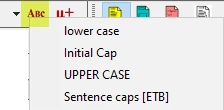
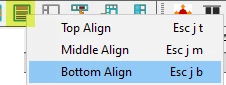
There are two menu files involved:
- ETB-menus.cfg which is in the user area in Workspaces\...\menus and
- customui.cfg which is normally placed in $HOME\fminit\configui\, but can be elsewhere if defined in the user's maker.ini (which is necessary to avoid access to the installation directory in IT environments).
Since we have views (FM-11) ETB-menus is a combination of the original menu, appended with ETB-specifics. These specifics are mainly the same as the file customui.cfg (details later).
For grouping/naviagtion purpose I have introduced (among others) these lables in the files:
This is an excerpt from ETB-menus.cfg:
[etb Flyout Commands]
#-- Since FM-14 Flyouts use a new mechanism: a new command with parameter
<Command ETBCellAlignPopup    <Label ETB Cell Alignment…>
                              <Definition \x914>
                              <Param ETBCellAlignMenu>>
<Command ETBChangeCasePopup   <Label ETB Change text case…>
                              <Definition \x914>
                              <Param ETBChangeCaseMenu>>
[etb Flyout Menus]
<Menu ETBCellAlignMenu <Label Cell Alignment…>>
  <Add AlignTop               <Menu ETBCellAlignMenu>>
  <Add AlignMiddle            <Menu ETBCellAlignMenu>>
  <Add AlignBottom            <Menu ETBCellAlignMenu>>
<Menu ETBChangeCaseMenu <Label Change text case…>>
  <Add LowerCaseText          <Menu ETBChangeCaseMenu>>
  <Add InitialCapsText        <Menu ETBChangeCaseMenu>>
  <Add UpperCaseText          <Menu ETBChangeCaseMenu>>
  «Add ETB_ToSentenceCap      «Menu ETBChangeCaseMenu»» # inactive
[SkipInCustomUI_cfg-Begin]
«-- Skipping this avoids error "Command or menu .. has not been defined"
[etb Commands by Script]
...
[etb Menu]
<Add ETB_ToSentenceCap        <Menu ETBChangeCaseMenu>> # active
[SkipInCustomUI_cfg-End]
To get the buttons and menus working (for FM-14):
- customui.cfg must not contain the lines in ETB-menus.cfg between [Skip...-Begin] and [Skip...-End]
- The menu entries Add ETB_ToSentenceCap must be inactive in [etb Flyout Menus] and active in [etb Menu]
- Due to 1 [etb Menu] does not exist in customui.cfg
- After start of FM the menus are not intact - because no workspace is assigned. Only after opening a document the workspace ETB becomes active - but the two mentioned buttons are inactive.
- After switching to workspace to Authoring (or other) and back to ETB, the button ETBChangeCasePopup is active and working, but the other is not
- After switching to workspace again to Authoring (or other) and back to ETB, also button ETBCellAlignPopup works as intended
- Nevertheless in the console log you find the message maker: When reading the menu customization file c:\users\klaus\appdata\roaming\d+dd\etb14up\etb-en\customui.cfg, maker: (440) The ETB_ToSentenceCap command or menu has not been defined.
Why the heck depends the working of button ETBCellAlignPopup on the set-up for button ETBChangeCasePopup? You don't see this effect in the above explanations - but on the long way to the current stage the results of various set-ups clearly gives this impression. Maybe it is due to the fact, that the relevant command ETB_ToSentenceCap is created in a script - and the sequence of menu building is not transparent at all.
→ Can we use this set-up for all following FM version? In principle, yes, says Radio Eriwan, but …
Set-up for FM-15
All the same as with FM-14 with the following exceptions:
- Neither is a second switch of the workspace required (6),
- nor does the log message appear (7).
Set-up for FM-16 and FM-17
All the same as with FM-14 with the following exceptions:
- (2) The menu entries Add ETB_ToSentenceCap must be active in [etb Flyout Menus] and in active in [etb Menu]
- Adobe had fixed the problem requiring the Workspace switching (4…6) and the message in the log does not appear (7).
Conclusion
It is possible to create 'only one' installation process for the various FM versions, but the cfg files must be carefully built observing the required deviations.
Thank you for reading!


 AdChoices