
Known Participant
November 30, 2022
Answered

Single and dual columns on a single page?

  • November 30, 2022
  • 1 reply
  • 578 views

I am using Framemaker 11 (Windows) and have not yet figured out if the following task is possible. What I am looking to do is simple in Microsoft Word, but I can't find a way to do the same in Framemaker.


Task:


I am using a single column layout to start a chapter of a book with, but at some point, I need to switch to a two column layout.  However, the point at which I will make the change from 1 to 2 columns will not be at a page break.  The change will occur mid-page or somewhere other than a page break.  I need a way to have both column formats exist on a single page, but at the same time, allow me to add text to the single column section should I need to come back and add a paragraph or a new sentence to the single column section. IOW, the dual column section should dynamically move as the single column section expands.


I've created a video in MS Word to show what I'm looking to do: https://www.youtube.com/watch?v=iQK84TWurxo


I can create a new master page layout, yes, but the single and dual column layouts are inflexible when I do this, meaning, I cannot add additional text to the single column section without changing the text frames on the master page.


I've searched YouTube but can't find any tutorial examples.
    This topic has been closed for replies.
    Correct answer Barb Binder

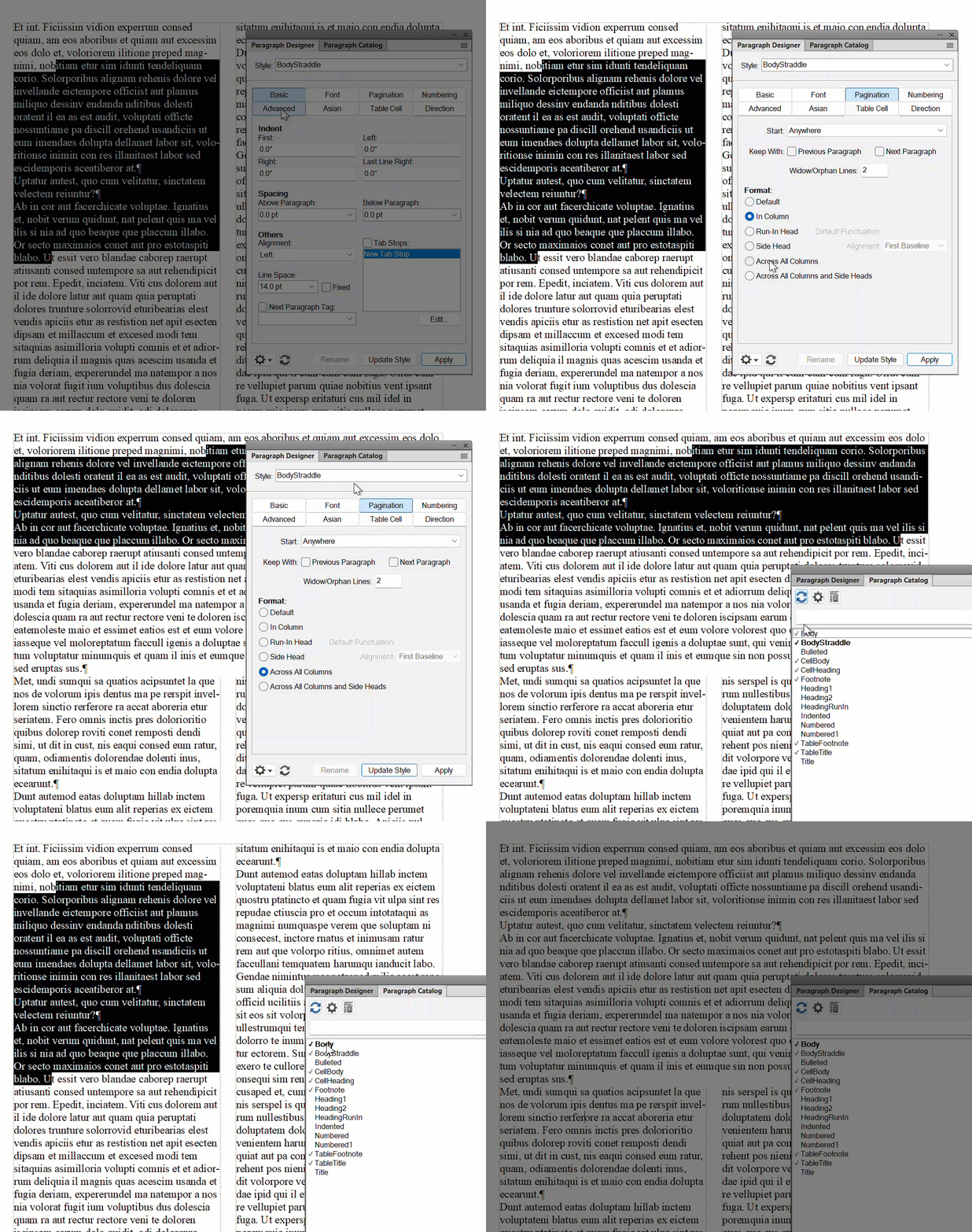
    Yes, set up a 2-column layout and create a paragraph style to straddle the paragraphs that need to span both. 

    Paragraph Designer > Pagination > Across all columns


    Leave the ones that don't as In Column.


    ~Barb


    1 reply

    Barb Binder
    Community Expert
    Barb BinderCommunity ExpertCorrect answer
    Community Expert
    November 30, 2022

    Yes, set up a 2-column layout and create a paragraph style to straddle the paragraphs that need to span both. 

    Paragraph Designer > Pagination > Across all columns


    Leave the ones that don't as In Column.


    ~Barb


    ~Barb at Rocky Mountain Training
    Sam StateAuthor
    Known Participant
    November 30, 2022

    Thanks.


    Question: What will your solution do with respect to footnotes?  Footnotes that appear in the single column section will show up in a single column footnote (at the bottom of the page), or in one of the dual columns?  And will a footnote in the dual column section be part of the dual column, or part of a single column at the bottom of the page?

    Barb Binder
    Community Expert
    Community Expert
    November 30, 2022

    Hi @Sam State;


    Whichever you prefer. You can set footnotes up to be in the same column as the reference, or straddle (span) both columns. Personally, in a two column format with straddle heads, I straddle the footnotes across both columns. But it's one or the other because the Footnote style controls all of the footnotes. And it's handled exactly the same way: In Column or Across all Columns. 

    ~Barb 

    ~Barb at Rocky Mountain Training