
mwolfthal
Inspiring
September 16, 2025
Answered

skipping files in chapter numbering

  • September 16, 2025
  • 4 replies
  • 268 views

Is there a way to configure chapter autonumbering that skips over single page files that are section dividers and not content chapters?

    Correct answer Barb Binder

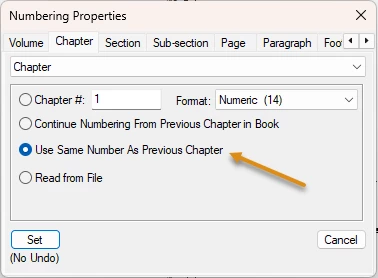
    Another option is telling the chapter numbers in the book window to not increment in the section divider files.

    Chapter 1—chapter #1

    Chapter 2—continue from previous chapter in book

    Chapter 3—continue from previous chapter in book

    Section divider—use same number as previous chapter (chapter counter stays at 3)

    Chapter 4—continue from previous chapter in book

    Chapter 5—continue from previous chapter in book

    Section divider—use same number as previous chapter (chapter counter stays at 5)

    Chapter 6—continue from previous chapter in book

    Chapter 7—continue from previous chapter in book


    ~Barb


    4 replies

    frameexpert
    Community Expert
    Community Expert
    September 24, 2025

    Right-click on the divider files in the book window and choose Numbering. You probably want to set these to Use Same Number as Previous Chapter.

    Barb Binder
    Community Expert
    Barb BinderCommunity ExpertCorrect answer
    Community Expert
    September 24, 2025

    Another option is telling the chapter numbers in the book window to not increment in the section divider files.

    Chapter 1—chapter #1

    Chapter 2—continue from previous chapter in book

    Chapter 3—continue from previous chapter in book

    Section divider—use same number as previous chapter (chapter counter stays at 3)

    Chapter 4—continue from previous chapter in book

    Chapter 5—continue from previous chapter in book

    Section divider—use same number as previous chapter (chapter counter stays at 5)

    Chapter 6—continue from previous chapter in book

    Chapter 7—continue from previous chapter in book


    ~Barb


    ~Barb at Rocky Mountain Training
    mwolfthal
    mwolfthalAuthor
    Inspiring
    September 24, 2025

    That's probably the simplest approach.

    Barb Binder
    Community Expert
    Community Expert
    September 16, 2025

    Hi @mwolfthal:


    I'm picturing a FrameMaker book list with incremental chapter numbers (i.e., Chapter 1, Chapter 2, Chapter 3) with unnumbered section dividers interspersed that are increasing the chapter count on subsequent chapters? If that is correct, right click the section divider chapters > Exclude and update your book. 


    If I missed the mark, then as per @Jeff_Coatsworth, please return the screenshots that will show us what you're asking. 


    ~Barb

    ~Barb at Rocky Mountain Training
    mwolfthal
    mwolfthalAuthor
    Inspiring
    September 24, 2025

    Unfortunately, it's a bit more complicated, because the section dividers have text on them that appears in the book TOC.  Excluding them when updating the book eliminates this text. 

    Jeff_Coatsworth
    Community Expert
    Community Expert
    September 24, 2025

    Ok - screenshots please? Use the web interface and the "Insert Photos" icon.

    Jeff_Coatsworth
    Community Expert
    Community Expert
    September 16, 2025

    Not sure exactly what you mean by chapter auto-numbering - are you talking about having the chapter headings auto-increment or applying page numbers to all pages using some sort of "chapter-page#" scheme. Maybe a screenshot would help?