

Almtuna
Inspiring
May 14, 2020
Answered

Specify text color in HTML5 output

  • May 14, 2020
  • 5 replies
  • 1566 views

In my FM19 document I have paragraph styles which are in black color. In my HTML5 output I want one specific paragraph style be orange instead. I have edited the paragraph style mapping to use the new color:
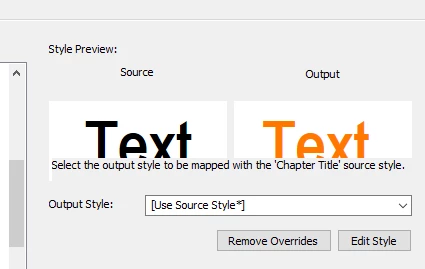
But in the generated HTML5 output, the characters are back in black. How do I keep the orange characters all the way?


    This topic has been closed for replies.
    Correct answer Jeff_Coatsworth

    Think I see the issue - you need a "#" in front of the colour definition in the CSS

    5 replies

    Jeff_Coatsworth
    Community Expert
    Jeff_CoatsworthCommunity ExpertCorrect answer
    Community Expert
    May 14, 2020

    Think I see the issue - you need a "#" in front of the colour definition in the CSS

    Almtuna
    AlmtunaAuthor
    Inspiring
    May 14, 2020

    Ta-da, it's working!!! I added the missing #, and now I've got orange text! Thank you very much!

    (The FM orange style preview fooled me.)


    Jeff_Coatsworth
    Community Expert
    Community Expert
    May 14, 2020

    And if you clear out that span stuff, does it show correctly?

    Almtuna
    AlmtunaAuthor
    Inspiring
    May 14, 2020

    First I tried:

    <p dir="ltr" class="FM_Chapter_Title"><span data-name="Chapter_Title" data-val="Programming With JDBC" data-showval="TRUE" data-format="Chapter_Title">Programming With JDBC</span></p>

    made no difference.


    Then I tried:

    <p dir="ltr" class="FM_Chapter_Title">Programming With JDBC</p>

    Still no difference.

    Jeff_Coatsworth
    Community Expert
    Community Expert
    May 14, 2020

    Ok, so find a chunk of text with that "Chapter Title" non-formatting and see what the HTML thinks it's styled as.

    Almtuna
    AlmtunaAuthor
    Inspiring
    May 14, 2020

    Here is an example:


     <div dir="ltr">
      <p dir="ltr" class="FM_Chapter_Title"><span style="font-weight : normal; font-size  : 36.0pt; "></span><span data-name="Chapter_Title" data-val="Programming With JDBC" data-showval="TRUE" data-format="Chapter_Title">Programming With JDBC</span></p>


    Strange, the font size is also different than expected.


    Jeff_Coatsworth
    Community Expert
    Community Expert
    May 14, 2020

    Have a look at the HTML generated - is it actually using the CSS you think it should be using?

    Almtuna
    AlmtunaAuthor
    Inspiring
    May 14, 2020

    If I do "show source" in my browser I get:


    <!DOCTYPE HTML>
    <html>
    <head>
    
     <meta http-equiv="Content-Type" content="text/html; charset=UTF-8" />
     <title>Introduction</title>
    
     <meta content="JDBC, API, database, server, Mimer, SQL, JDBC Driver" name="search-keywords" />
     <link rel="stylesheet" href="../../Mimer_JDBC_DriverNET.css" type="text/css" />


     where my css-file is specified, the one with:

    color:FF7800;

     Also, other style-mapping changes, like indentation and font size, do work.

    Almtuna
    AlmtunaAuthor
    Inspiring
    May 14, 2020

    The css file found in the output directory has the color as reqested:

    p.FM_Chapter_Title {
                        margin-left:8.640pt;
                        margin-right:0.000pt;
                        text-align:left;
                        text-indent:-4mm;
                        margin-top:20.000pt;
                        margin-bottom:0.000pt;
                        word-spacing:0.250em;
                        font-family:"Arial Narrow";
                        font-style:normal;
                        font-weight:bold;
                        font-size:48.0pt;
                        color:FF7800;
                        background-color:none;
                        text-decoration:none;
                        letter-spacing:0.00em;
    }

    Still the text is black instead of orange.