


Legend
July 31, 2015
Question

stacking order and external graphics

  • July 31, 2015
  • 2 replies
  • 170 views

I missed the recent(ish) webinar on using the FM graphics tools, which may have answered this question …

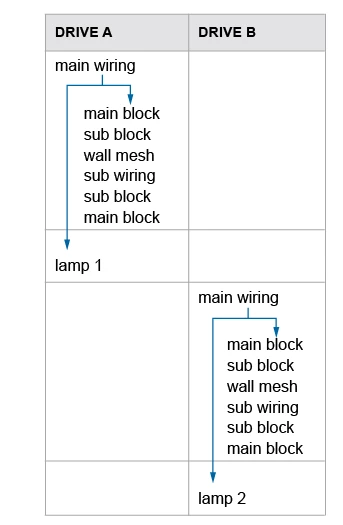
I need to present some information as shown, and I'm finding it very tricky to a) anchor; b) adjust the graphic if I try and do it inside FM. While it's easier to tweak the final .pdf in Illustrator, this is (of course) far from ideal in terms of maintenance and future-proofing: but if I create the graphic as an .eps in Illustrator, I can't work out how to put it behind the text in the table cells. Hints and tips welcome!
This topic has been closed for replies.

2 replies

Arnis Gubins
Inspiring
July 31, 2015

You can try creating an anchored frame in the first paragraph in the table cell that is set to outside column (or text frame) and then use negative offsets to move it over top of your table cell content [don't forget to set the AFrame to have a fill of None for transparency]. You can then insert the arrows inside of this AFrame and they will move the table cell as expected.

Jeff_Coatsworth
Community Expert
Community Expert
July 31, 2015

You mean this one - http://www.slideshare.net/shlomoperets/frame-maker-graphictoolswebinar ?