



Almtuna
Inspiring
Mar 8, 2021 7:17 PM UTC
Answered

Straight, single quotes problem in HTML5 and chm output

In my FM2019 document I have the following text:
"An empty string (i.e. N'') is a defined value."


In FM it looks like:

But in the Responsive HTML5 output, the 2 single quotes are not there:

And they are also lost in the chm output:

What can I do to keep them in the generated output?

EDIT:

Even worse, take a look at this FM document:
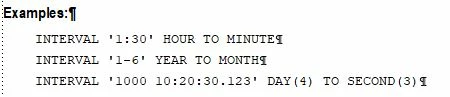
But not much is left in the chm file:
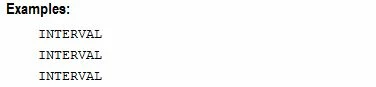
 

This topic is closed to new replies. Start a new post to keep the conversation going.
Namita DeswalCorrect answer
Adobe Employee
Mar 9, 2021 5:39 AM UTC

Kindly use the Update 8 of FrameMaker 2019. This issue is fixed in it. You are directly use the https://supportdownloads.adobe.com/product.jsp?product=22&platform=Windows link to navigate to 'Update8'.


Thanks,

Namita

16 replies

Namita DeswalCorrect answer
Adobe Employee
Mar 9, 2021 5:39 AM UTC

Kindly use the Update 8 of FrameMaker 2019. This issue is fixed in it. You are directly use the https://supportdownloads.adobe.com/product.jsp?product=22&platform=Windows link to navigate to 'Update8'.


Thanks,

Namita

Translate
Almtuna
AlmtunaAuthor
Inspiring
Mar 9, 2021 8:45 AM UTC

15.0.8.979, as suggested, generates the correct output!

Thank you vey much for the download link.


But I think it's strange that my previous version claimed to be "up to date" when I asked it to check for updates.

On my other computer, on which I installed FM last summer, I'm running version 16.0.0. But I can't remember where I found that download link.

Translate
Community Expert
Mar 9, 2021 8:53 AM UTC

I just checked, what my FM 2019 (15) says. It correctly said that it is not up-to-date and I should download update 8. Hm.

Also please check for updates in FM 2020 (16)! The current version is update 1 (16.0.1). When FM does not find the update, then download it from the download link.

Translate
Bob_Niland
Community Expert
Community Expert
Mar 9, 2021 12:53 AM UTC

Some random observations:
What does the output look like as PDF?
Avoid mapping to ', as that is only a legitimate named Entity in XHTML1 (not in HTML4 or 5).

To avoid any risk of SmartQuotes battles with FM, consider implementing all straight quotes as Variable:
Name: U+0027 APOSTROPHE
Def: \u0027

… and if that doesn't survive into HTML5, the problem is later in the workflow.

Translate
Jeff_Coatsworth
Community Expert
Community Expert
Mar 8, 2021 9:08 PM UTC

Ok, you're short a patch - the 2019.0.8 version came out the end of Jan 2021. But first I would try using the U+0027 Unicode insertion of the single quote (or 

'

 in HTML).

Maybe @LinSims or @Bob_Niland can help out with this stuff (I don't stray off the default path very much)

Translate
Almtuna
AlmtunaAuthor
Inspiring
Mar 8, 2021 9:28 PM UTC

Entering U+0027 gives me the FM character

which is the same as I get when I press the regular straight quote key in FM.


And "Updates..." says

"No new updates

Adobe FrameMaker (2019 release) 64 bit

Your app is already up to date."

Translate
Almtuna
AlmtunaAuthor
Inspiring
Mar 8, 2021 10:43 PM UTC

I have now learnt to do ctrl+' to get the straight quote character.

I've also edited the MasterPage Character Macros table, where I tried both Replace With ' and ' - but no improvement at all.

Translate
Jeff_Coatsworth
Community Expert
Community Expert
Mar 8, 2021 8:29 PM UTC

Ok, are you doing anything special to add the single quote characters?
Have you tried to leave off the character tag and see if that has any impact in the rendering?
What version of FM2019 are you on? Are you all patched up?

Translate
Almtuna
AlmtunaAuthor
Inspiring
Mar 8, 2021 8:43 PM UTC

If you reload my previous reply, you'll find my attempt without the character tag. (I added it some minutes ago.)

The straight, single quote character is a bit tricky to add, because if I just enter that key, I'll automatically get a non-straight, single quote. (Whatever it is called.) Which is perfect in regular text.

However, when writing code samples I need the straight ones. My trick is to copy-and-paste one, either from Notepad, or an already existing one in the FM document.

I'm using FM 19, version 15.0.7.973.


Translate
Jeff_Coatsworth
Community Expert
Community Expert
Mar 8, 2021 8:11 PM UTC

So what's that "FM_Data_10" thing? Is it a paragraph tag or character tag? 

Translate
Almtuna
AlmtunaAuthor
Inspiring
Mar 8, 2021 8:15 PM UTC

It's a character tag, to use courier new font size 10 for syntax elements in regular text.

I did a test without the character tag:

FM:

HTML output:

HTML source:


Translate
Jeff_Coatsworth
Community Expert
Community Expert
Mar 8, 2021 7:41 PM UTC

What's the HTML code look like in that spot? Are the single quote marks taken right out or are they rendered in such a way that the browser can't show them (btw, have you tried different browsers?)

Translate
Almtuna
AlmtunaAuthor
Inspiring
Mar 8, 2021 8:02 PM UTC

The FM text: An empty string (i.e. N'') is a defined value.

Has the following html source:


The FM text:

Has the following html source:

Zoomed in:


(Same problem in Firefox, Chrome, Edge and Opera.)


Translate