Known Participant
May 18, 2010
Question

Strange Facet of Imported Graphic: ò\e2

  • May 18, 2010
  • 3 replies
  • 825 views

Hello Framers,

I am using Frame 7.1 and have just taken over a project from a colleague who is sometimes, er, careless with best practices.

So I MIF-washed all files (replacing all OLE2 graphics) and tried to save as RTF. Frame crashed. I looked at the Object properties of some imported graphics and found this:
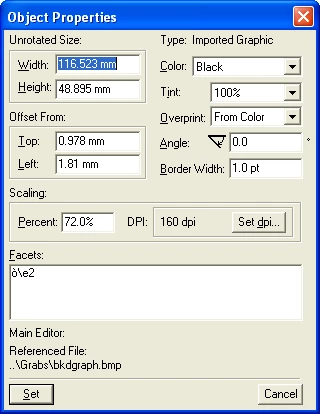
A minute later I looked again at the same properties again and the Facet was "DIB" -- in other words normal.
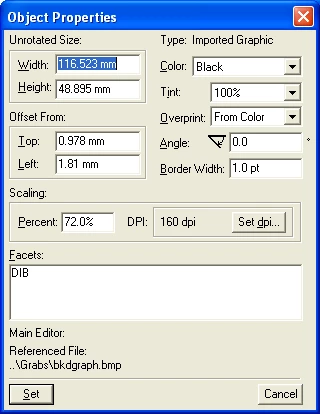
This is the same graphic, same command (!go). In between I had looked at some other graphics and seen another with the strange facet. Because it is intermittent it was hard to get such a pair of grabs.

I looked in the MIF and could find nothing unusual (but I am by no means a MIF-guru).

Has anyone else seen such strange facets? Or have any ideas? As a workaround I shall try re-importing all graphics and hoping that the problem does not come back.

--- Derek

    This topic has been closed for replies.

    3 replies

    Known Participant
    May 19, 2010

    Thanks Sheila and Art,

    Since this is an intermittent problem it's hard to investigate. I entirely agree about BMPs and embedding, but I inherited this project and that's how it is.

    I do the Save As RTF because my SME is enamoured of Word; I convert the RTF into DOC and he can then edit in his favourite tool. With Track Changes I can then see what needs to be done in the Framemaker source.

    I have Windows XP SP3 running with 2GB RAM so I don't think I am hitting a resource limit.

    Before posting I had extracted all embedded graphics and included them as PNGs by Reference. But Save As RTF still crashed on one chapter; it was while investigating the graphics in that chapter that I stumbled on the strange facet problem.

    I'm 99% certain that the Save As RTF crash is related to the  graphics; if I delete all graphics the save goes OK. I cannot say for sure that it's related to the facets but an intermittent crash related to an intermittent strange facet sounds mighty suspicious.

    Yesterday after posting I re-embedded all graphics (delete and re-import with ! f i f ) but it still crashed. So I converted the larger graphics to PNG and re-imported them. I tried a quick Save As RTF and it worked. Hurrah! So I repeated the Save, this time to another directory, and it crashed. This morning it crashed again (but not before I had made a copy of the successful save ! ). There are still small graphics (screen caps of buttons in running text) but it will take me ages to convert all of them (it took an hour to do the larger graphics).

    Thus I have files to keep my SME happy for now, but there may be some nasty surprises waiting for me somewhere down the line. That's why I'd like to nail this to the wall. I'll try Art's suggestion of yet another MIF-wash (which will be the third) and report back if there's anything new.

    --- Derek

    Inspiring
    May 18, 2010

    Correct me if I'm wrong, but if you replaced all the OLE links with imported-by-ref graphic files, any wierd facets should be irrelevant... unless you're copying them into the file, which isn't recommended.

    I would try MIF-washing after correcting the OLE links... to clean up any left-over garbage. Ideally I'd try it after you purge graphics and before you re-import.

    And as Shelia says, BMP isn't usually first choice for a graphic presentation. May want to do a batch save of the graphics to PNG or another format before re-importing them.

    May 18, 2010

    I'm not clear whether you're thinking that Save as RTF is somehow connected to the facet properties funkyness?

    I've seen the "corrupted" facet display name before, probably with ver 7, but I don't recall any specifics, sorry. I always assumed it was FM running into some memory limit;  it never seemed to cause any problem that I know of.

    BMP files tend to be pretty large because it's not a compressed format, so I wonder if you might have better results if you could save your files as PNG instead.

    Sheila