This topic has been closed for replies.
Correct answer K.Daube

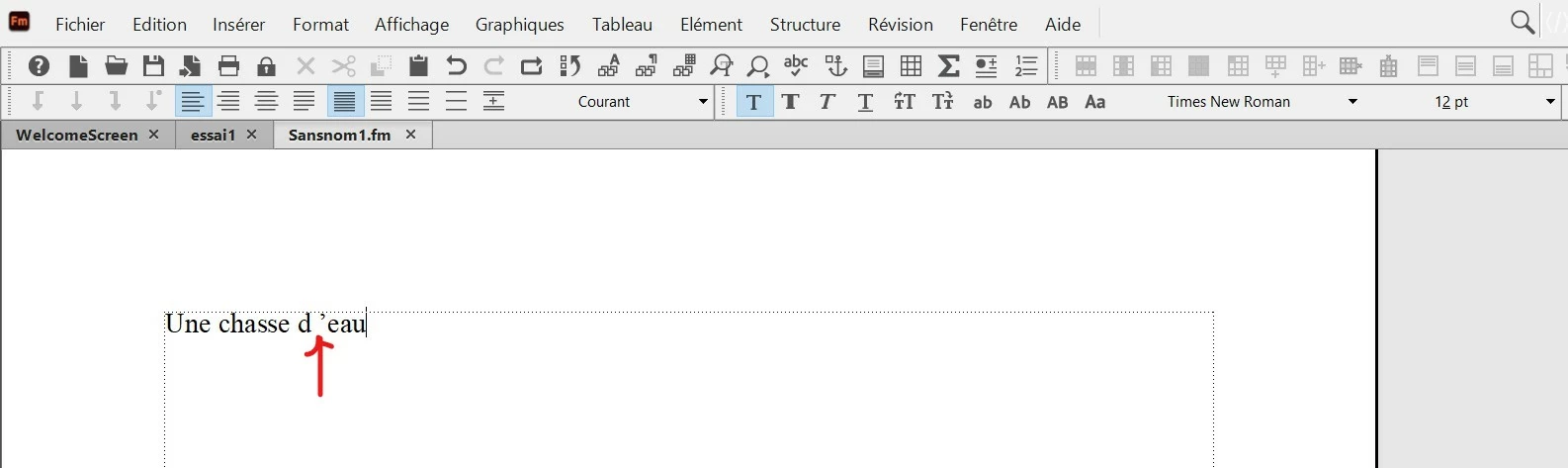
It is a consequence of Format > Document > Text Options: Smart Quotes. It you set this OFF (clear the box) then the blank disappears! (tested in FM-16, not FM-17 - but there it seems to be the same).

5 replies

Inspiring
May 29, 2023

In Format / Document / Text option, I have unchecked the box (see red arrow) and it works.

Do you think I have to clear the symbols inside Text option ?

As I am obliged to do it for each document, do you think it is possible to do it in preferences panel ?


K.Daube
Community Expert
Community Expert
May 29, 2023

This is definitely a document property and can not. Be set in the Preferences which sets only session properties.

To have in each document, open your template document and set it there. Then you can import it (file > import > formats: document properties) into an selection of fdocuments in a book (for example). There is no method to import into - for example - all open documents. Only to the active document you can import.

Inspiring
May 29, 2023

The language of the software is french, and the font is Times New Roman 12 :


K.Daube
Community Expert
K.DaubeCommunity ExpertCorrect answer
Community Expert
May 29, 2023

It is a consequence of Format > Document > Text Options: Smart Quotes. It you set this OFF (clear the box) then the blank disappears! (tested in FM-16, not FM-17 - but there it seems to be the same).

Bob_Niland
Community Expert
Community Expert
May 29, 2023

I'm not sure it matters, but for the paragraph in question, what is:
Format ▼
  Paragraphs » Paragraph Designer…
    /Font\
      Language: [??] set to.

Inspiring
May 28, 2023

I am using Frame Maker 17.02 for Windows.

If I try to export in PDF, the problem is always the same.

K.Daube
Community Expert
Community Expert
May 28, 2023

To check, we need to know the exact FM verion (Help > About) - because in this area thing were not stable.