
Legend
March 5, 2020
Answered

structured FM 2019 – topic titles in tree view

  • March 5, 2020
  • 1 reply
  • 2363 views

Looking forward to giving FM another chance handling my DITA files … so I've duplicated a whole set of topics and daringly opened the .bookmap.

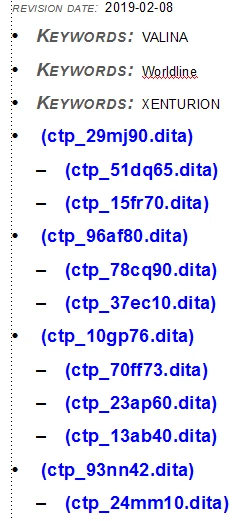
The good news is, it opens! but now I'm immediately puzzled by the interface. I was hoping for a toggle between file name / topic title, like the one for an unstructured FM .book. All our topics deliberately use short filenames where only the prefix is intended to be human-readable, precisely because the file always contains the title.

Any hints on how to display title and file-name so I can navigate efficiently?
This topic has been closed for replies.
Correct answer erinw82826097

That's encouraging! thanks.

I've tried document view, though, and it doesn't help :-{ still no <title> elements visible.


Hello. Sorry to interject... Are you wanting to have your document title of "Introduction" display in the tree view of your navigation?

Sometimes I find after building a new ditamap the "friendly" titles don't carry across to the ditamap tree. I suspect when you toggle between the Show NavTitle/Show Filename button nothing changes?

If so, click on the top most ditamap item in the tree on the left, in your screenshot that's "Setting up and....". In your Structure view on the right, you will notice the whole map* is highlighted. Leave it highlighted and right click and select "Update References". Once you get the dialog box, it should be defaulted to Update Topicrefs in File and All. Click OK. After this, you should then see the document title in the tree view.

Also, if you click on the file in the tree view - so click "ctp_29mj90..." and llok at the structure view change - it should show that your navtitle of that file is "Introduction".

I hope this helps.

Erin

1 reply

Adobe Employee
March 5, 2020

I think you might be looking for this


Thanks

Amitoj Singh

Legend
March 6, 2020

Sort of! but I don't want to display the navtitle, which I have never had to use except for 'empty' topicrefs. Here's a screenshot with structure and text view of a typical topic, plus the navigation panel. The topic has a <title> element, and this does not show up in the navigation panel.


Adobe Employee
March 6, 2020

Sorry, what is shown is the navtitle of the topic. The actual title is seen in the structure view.


Thanks

Amitoj Singh