
Structured FrameMaker 11 - Internal Error: 11004, 13758788, 13759082, 16502485
Any information that you can provide concerning the following error message will be appreciated:
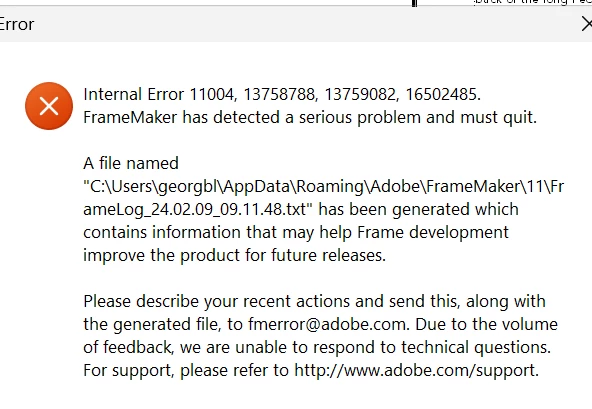
Background:
We are working with the following version of Structured FrameMaker 11 Version: 11.0.0.380.
We are in the process of upgrading to Windows 11 and are performing testing on a virtual machine, which we access by remoting into it. This machine has Windows 11 and Amazon Corretto (X64) VERSION 21.0.1.12 deployed to it.
We produce financial factsheets that are created by importing an xml file into Structured FrameMaker, which converts the xml file into a set of formatted FrameMaker financial factsheet files. An application has been created that we launch from the FrameMaker menu that parses each of the FrameMaker financial factsheets into individual PDF files. There are groups of factsheets that are produced, ex, Fluctuating, Offshore, Money Market. The sets of Fluctuating factsheets and Offshore factsheets are parsing correctly. Only the sets of Money Market factsheets are throwing this error message.
I copied some of the Money Market FrameMaker factsheet files to my office laptop, which has Windows 10, and the parsing application is performing correctly, which leads me to believe that the issue is not with the FrameMaker files.
Because we are remoting into this virtual machine, I’m wondering whether this issue may have something to do with that?
Any information that can be provided will be appreciated.


 AdChoices