
Known Participant
March 24, 2023
Question

Symbol Page break when hide conditional tag in Framemaker.

  • March 24, 2023
  • 2 replies
  • 345 views

Hi Everyone,


We using Framemaker 2019 for create documents.

On document, The "TS_GTM_REQ12_100" content on the TS is tagging Internal tag (blue color) at the top of the page.
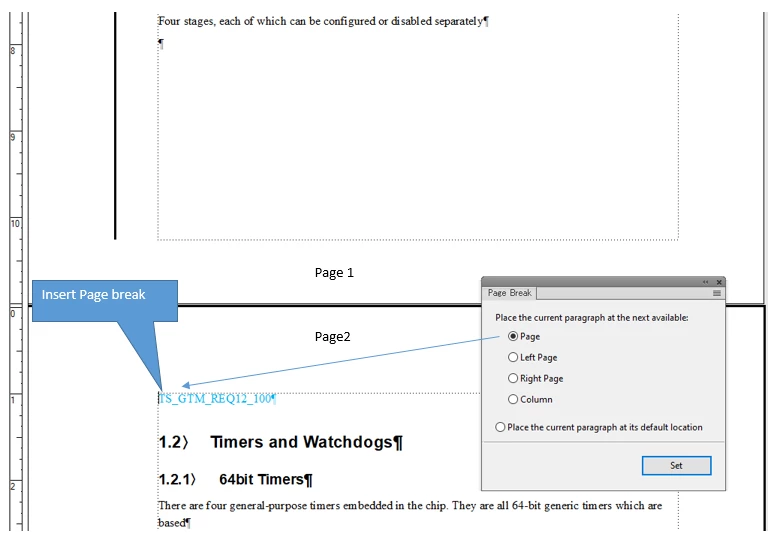
 

However, when hide conditional tag, the content is hidden along with the position of the page break mark being lost. So, section [1.2 Timers and Watchdogs] jump to page 1.
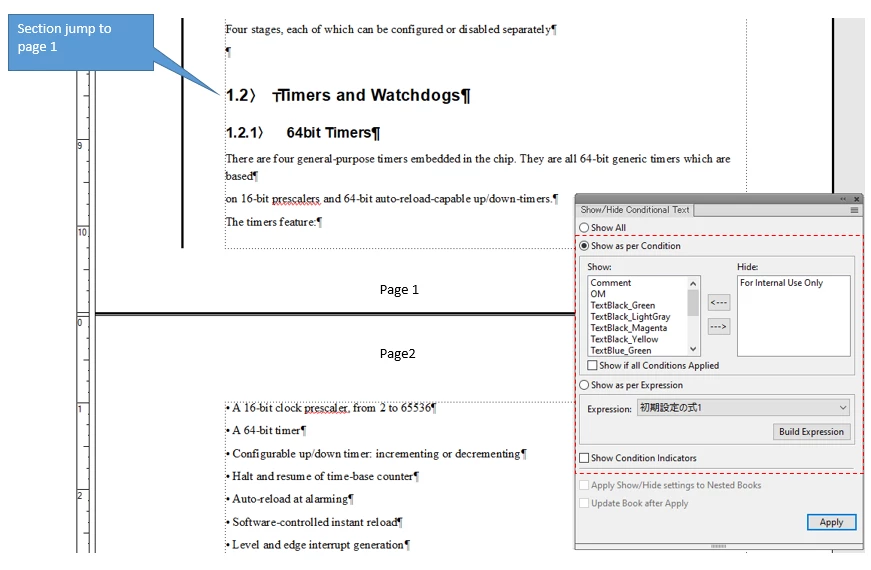


How to section [1.2 Timers and Watchdogs] still at page 2 when hide conditional tag (keep Page break)?

Best Regard!


This topic has been closed for replies.

2 replies

Community Expert
March 24, 2023

Hi,


When the blue paragraph TS_GTM_REQ12_100 has the setting to start on a new page (either with the Paragraph Designer or with the Page Break pod) and you hide the condition of this paragraph, then the page break is also hidden. The page break is not something which exists without the paragraph.

  1. You have to set the following paragraph to start on a new page, or you can also insert empty paragraphs at the end of page one. Not elegant 😉


Best regards, Winfried

Bob_Niland
Community Expert
Community Expert
March 24, 2023

To reinforce the point that Winfried is making, later versions of FM have an
Insert » Page Break…
operation, but FM has no distinct internal object for PBs. What the PB feature does is apply a Pagination override to the presently-selected paragraph.

In addition to the Conditional complication in play here, if the pagination was implemented as an override, it's at considerable risk of just vanishing entirely upon some future update of the Paragraph Format in use.

Known Participant
March 28, 2023

I also think the problem is in adjusting the layout of the sections.

Jeff_Coatsworth
Community Expert
Community Expert
March 24, 2023

I think you just need to disentangle the page break from the conditional text - why not put the page break back on page 1 so you don't have a gap when the conditional text is hidden on the top of page 2?

Known Participant
March 28, 2023

Hello Jeff,

In this case, TS_GTM_REQ12_100 is used for marking content for the entire section 1.2 Timers and Watchdogs.
In addition, section 1.2 Timers and Watchdogs page breaks through page 2 (layout adjustment). Therefore, the content TS_GTM_REQ12_100 with conditional tag is also placed at the top of the page.
I also found the above request to be very difficult to respond.