
Tab leader dots in LOF - some square, some round in Asian languages
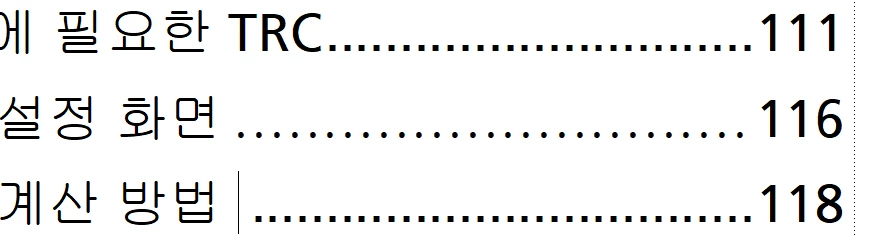
In my Asian language manuals, the tab leader dots in the LOF are square if the figure title ends with a Latin character, and round if it ends with an Asian character, as before 111 and 116 below. If I manually add a space after the last Asian character in the LOF, the dot becomes square, as before 118 below. In the chapters, all the periods are square.
If I add a space to the end of the figure titles in the text, the dot will be square in the LOF only if there's an index marker after the space. (This might be true with other markers, but I didn't test them.)
I'm thinking that the hex code of the character before the leader tab determines the shape of the leader dots. If single-byte, the dot is square, if double-byte it's round. My work-around is to either add spaces manually after the figure titles in the LOF or add a space and an index marker (also a space) after each figure title in the text.
Any thoughts on a better way?


 AdChoices