Known Participant
August 2, 2013
Question

Table Content Disappears

  • August 2, 2013
  • 4 replies
  • 1115 views

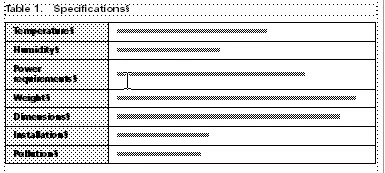
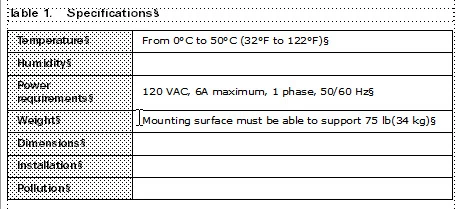
I am using Tech Suite 4/Frame 11 on Windows 7. Why do I have table content disappear and reappear at times? When I zoom up, at times only partial content appears. Also, in the images below, the first is 100%, the second is 120% and the third is 140%. When I zoomed up to 120%, the content partially appeared, but when I started to scroll to the right to view this table better, the content totally disappeared. What is going on? Is this another bug with Adobe? It is frustrating wondering what may be in the table for content when it comes to outputting to PDF or making updates.
    This topic has been closed for replies.

    4 replies

    mrdakotaAuthor
    Known Participant
    August 2, 2013

    Setting the preferences to a different Greek size has no bearing on this issue. It is when I zoom up to see a table more clearly, the text disappears. As a test, I switched the Greek font to 12pt from 7pt. This made it so I had to zoom up to nearly 400% to see the info in the table, but it still had missing text.

    Matt-Tech Comm Tools
    Community Expert
    Community Expert
    August 2, 2013

    You're saying that after increasing the greek text setting that your 100% view is the same???

    -Matt Sullivan, FrameMaker Course Creator, Author, Trainer, Consultant
    mrdakotaAuthor
    Known Participant
    August 2, 2013

    The image is at 200 percent after increasing the Greek to 12pt shows missing content. 100 percent to 160 percent showed the same as in the first image provided in the start of this thread.

    This document is a template that is 11 x 17. What I notice after in zoom up to higher settings when I can start to see content is that, to see the entire table, I will click on hold the the scroll bar and move either left or right. When I do this with the mouse holding down the bar and moving either direction, the content comes back either in entirety or partially adding more content to see. If I let go of the mouse from scrolling, then at times the total table's content disappears. Frustrating!

    Matt-Tech Comm Tools
    Community Expert
    Community Expert
    August 2, 2013

    Your 100% view shows greeked text, which means your preferences are set to *not* display type at or below that point size.

    -Matt Sullivan, FrameMaker Course Creator, Author, Trainer, Consultant
    mrdakotaAuthor
    Known Participant
    August 2, 2013

    No, refresh does not work.

    Jeff_Coatsworth
    Community Expert
    Community Expert
    August 2, 2013

    Does the issue go away when you refresh (Ctrl-L)? FM sometimes has issues with displaying text fast enough