

Community Expert
July 11, 2022
Answered

Table footnotes continuity

  • July 11, 2022
  • 2 replies
  • 1682 views

I am working with a large table with a lot of table footnotes. But FrameMaker seems to have a mind of its own with the naming of my footnotes.

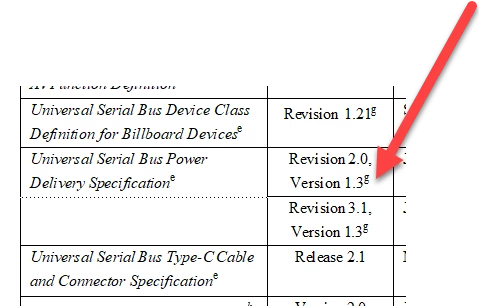
I want to insert a table footnote beside the "g" and according to the continuity of the other footnotes, this footnote should be "i".

BUT FrameMaker can't figure that out. It inserts an "h". If I insert my footnote in another place in the same table, I CAN have my "i" (which is the right letter), but apparently not beside a "g"...

What is happening? And how do I fix it? It seems like some sort of bug.?
    This topic has been closed for replies.
    Correct answer LinSims

    aha - ok. Actually I believe this is the first time I have to make FM insert footnotes in a specific order.

    So... can I somehow force FrameMaker to insert footnotes in a specific order? The paragraph style is not a numbered style, so that's not an option, unfortunately.


    Not that I'm aware of, if you want to autonumber them. I think you'd have to modify the paragraph tag for each one to put the letter in that you want used, and you won't be able to have FM renumber if that becomes necessary.

    2 replies

    4everJang
    Legend
    July 12, 2022

    My client needed to have the footnote number in superscript but enclosed in normal case brackets. FM does not offer any way to do this - either all footnote symbols (including the brackets) are superscripted or none - there is only one setting for the formatting of the entire footnote label. But as my client (the EU) does not take 'no' for an answer, I hijacked the FM footnote mechanism and created my own labels and set a custom format for the footnote numbering to show an empty string. In that way, I can number and style the footnotes however I want and still use FM to put them at the bottom of the page as desired. Of course this relies on either having an underlying XML structure that can be created/augmented using XSLT or a fairly simple ExtendScript to get the highest existing letter for a footnote label in the table and insert the next one.
    But I do agree with Klaus that numbering footnotes in any other order than normal reading order is NOT serving the reader of the document, who should be number 1 to serve with any content styling. 

    LinSims
    Community Expert
    Community Expert
    July 12, 2022

    If they're demanding FM and also demanding it do something it wasn't built to do, they need to check their expectations.

    And you can, more or less, do it by just typing the brackets then inserting the superscript in between them. [ETA: as long as it's sequential, of course. What @FrameMaker-dk is being asked to do won't work that way.


    Although ... he could set it up so, like you did it, there's no autonumber in the footnote tag, but he can still do the footnote and just cross-reference to whatever he labels it as. Basically the way we handle endnotes.

    4everJang
    Legend
    July 12, 2022

    They - in this case the EU - do not demand any specific tool, just a very precise look of the finished documents. My client (their contractor) was using Arbortext with an ancient formatting package. I saved them from their constant stream of disasters by replacing Arbortext with FM. And of course pulling all possible tricks to make FM do what I want it to do. I have not yet failed in making anything work in FM.

    LinSims
    Community Expert
    Community Expert
    July 11, 2022

    In the English alphabet, h comes after g and before i, so FrameMaker is doing what it's supposed to.

    Community Expert
    July 11, 2022

    Thanks Lin. Thing is... I already HAVE a "h" footnote. If I did not, you were right ofcourse, but I have already inserted an "h" footnote elsewhere in the same table. So if FrameMaker would stick to the english alphabet, the next footnote in line should be "i"

    Bjørn Smalbro - FrameMaker.dk
    Bob_Niland
    Community Expert
    Community Expert
    July 11, 2022

    A couple of more obscure things to check:
    Format » Numbering » /Table Footnote\ ⦿ Custom
    Table Designer » /Basic\ Numbering: […by…]