Inspiring
March 8, 2017
Answered

Table-of-Content from FM7 -> FM12

  • March 8, 2017
  • 3 replies
  • 698 views

Hi All,

I have Opened a Book in FM12 which was originally written in FM7.

All Chapter Files are as expected, they have icon of Chapter File.

However, all TOC/LOF/LOT are also have icon of Chapter File.

When I update the Book, it does not show any TOC/LOF/LOT.

Is this normal? Does it require recreation of TOC/LOF/LOT?

Thanks.

    This topic has been closed for replies.
    Correct answer Barb Binder

    Here you go:

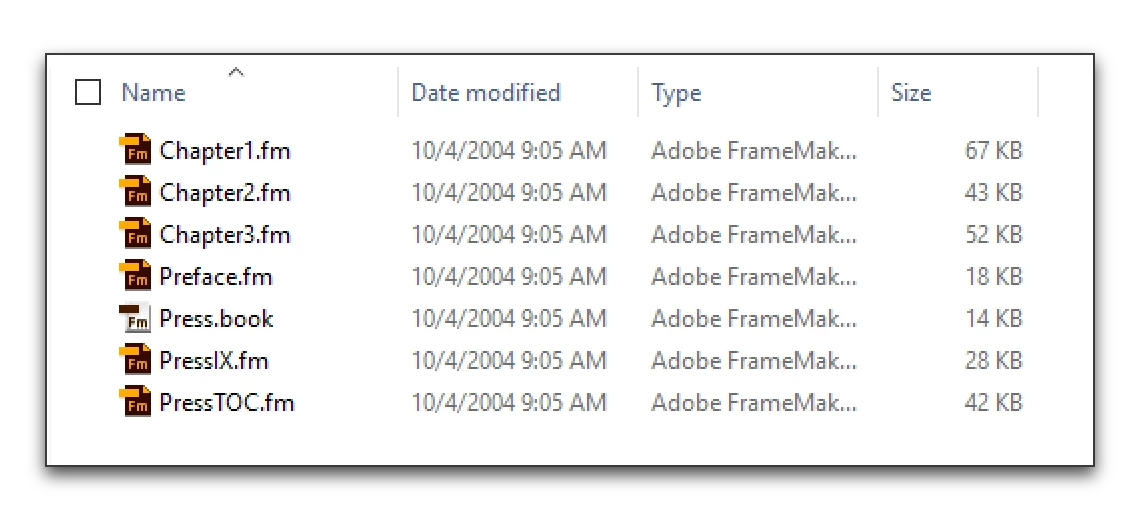
    1. This is a book with two generated files (TOC and IX) from 2004.
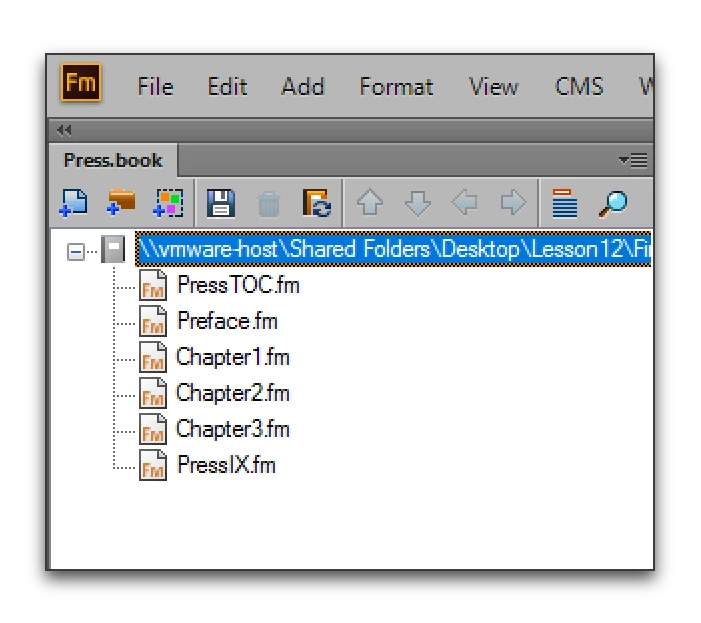
    2. When I open it in 2015, the generated files look like regular chapter files.
    3. First, I used Shift + File > Open all Files in Book, then Shift + File > Save all Files in Book to convert everything to 2015. (Work on a copy of the old book, of course.)
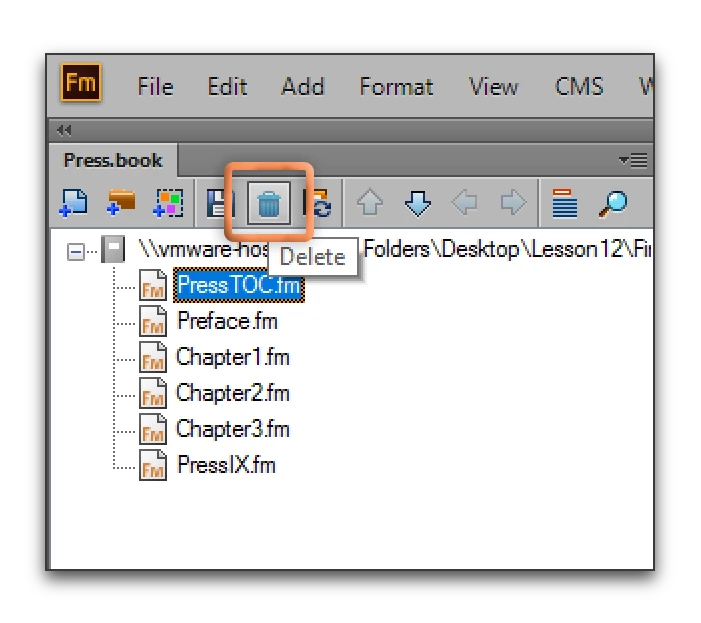
    4. Then I selected the first generated file (PressTOC.fm) and used the trash can icon to remove the file from the book, but not from the hard drive.
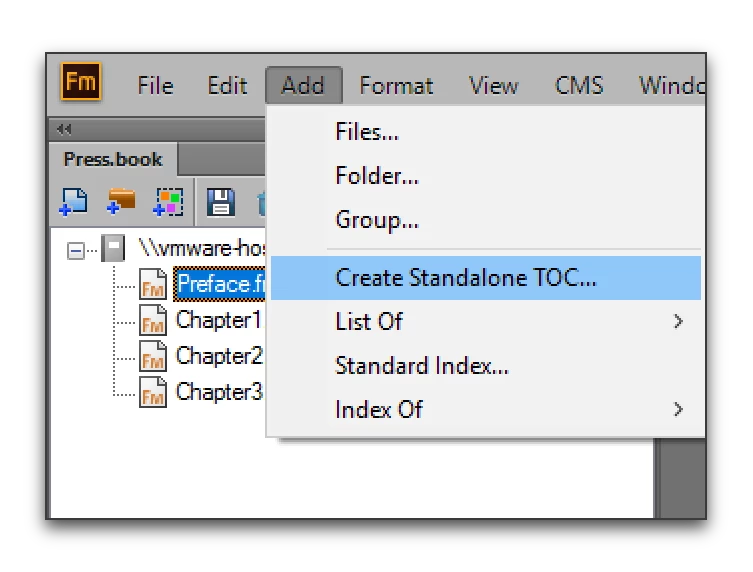
    5. Then I used Add > Create Standalone TOC  to add it back in. (Edit: I'm using 2015 for the screen shots—as I recall, Fm 12 doesn't use the term "standalone", but it's the same command to create the TOC.)
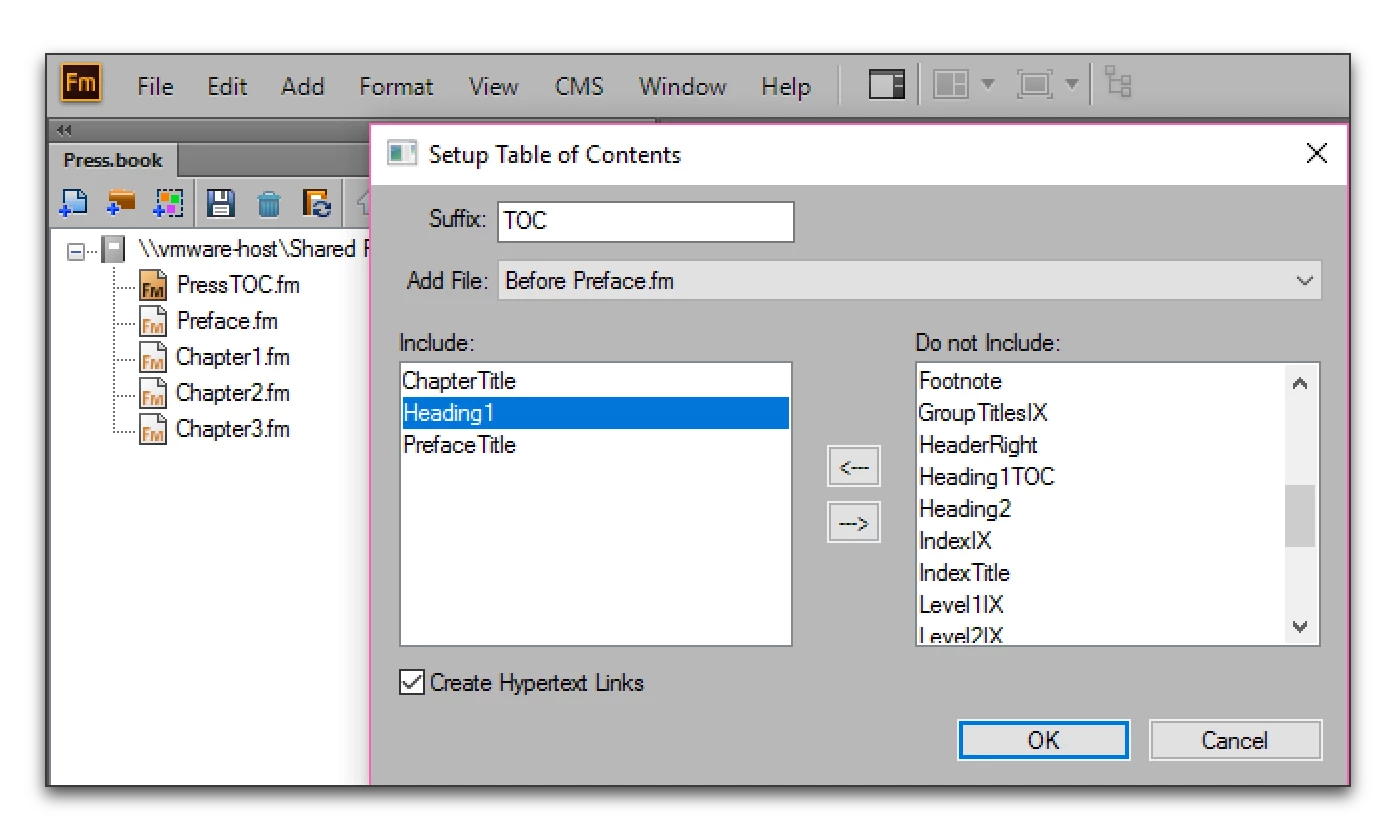
    6. I added the same headings that were in the original TOC. Then OK to add.
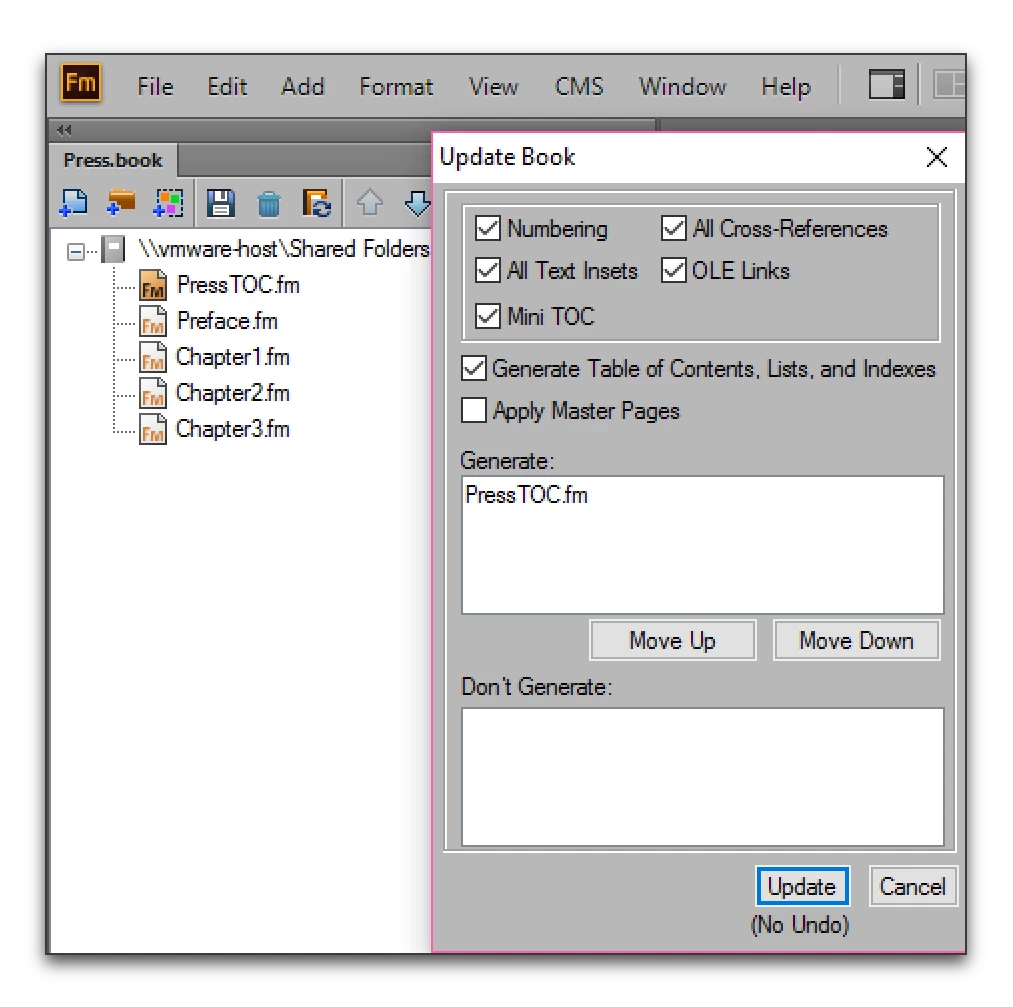
    7. Now I can update the book and PressTOC.fm is in the Generate list, and the icon shows the generated file.
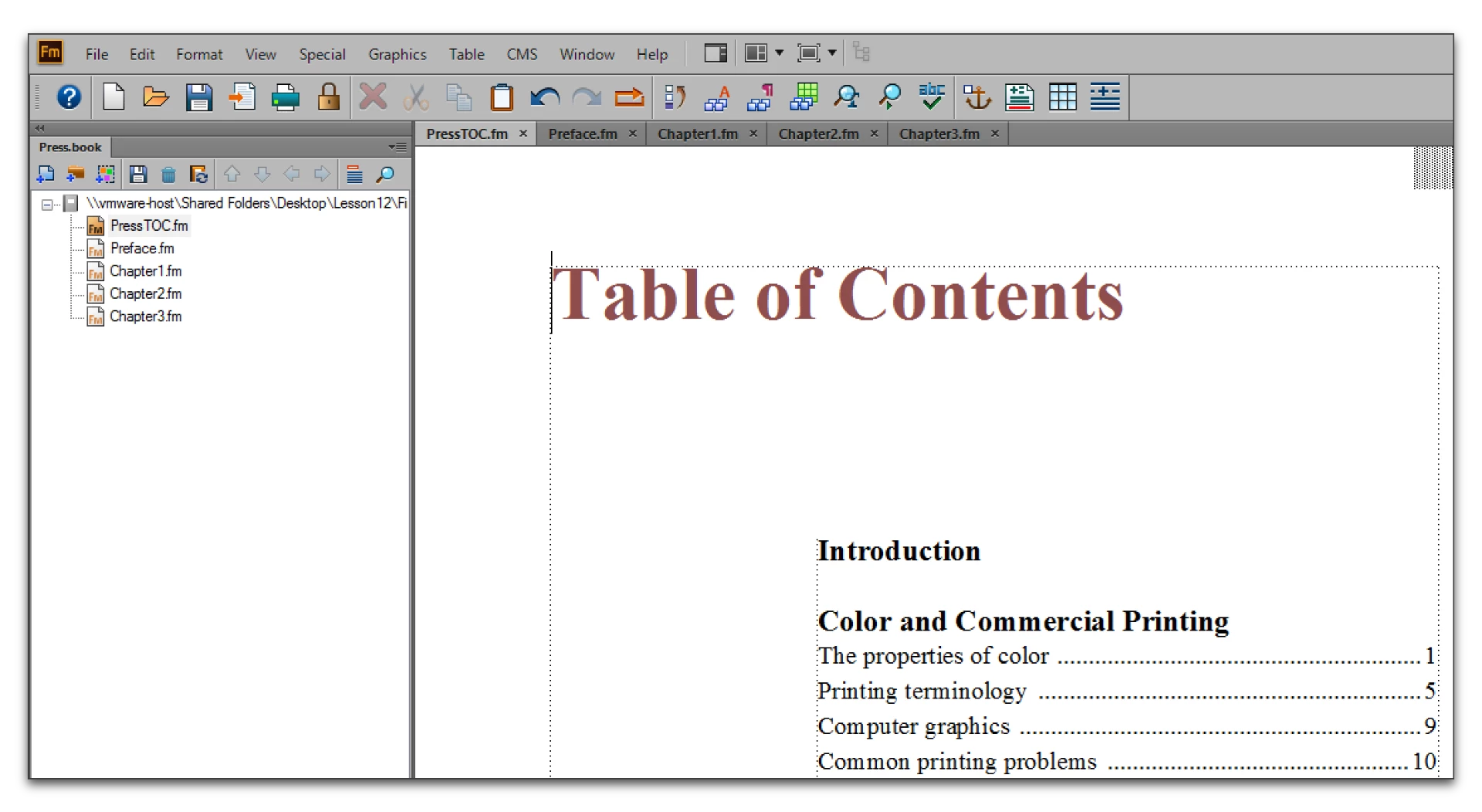
    8. Because the original file was in the folder I showed in the first screen shot, and because I didn't change any names, FrameMaker found the old PressTOC.fm file in the project folder and used it as a template file for the new TOC. (More on that process here: Adobe FrameMaker: Reusing a TOC or Index - Rocky Mountain Training ) The TOC is fully formatted and ready for updates.

    Repeat these steps for the LOT and LOF.

    3 replies

    Barb Binder
    Community Expert
    Barb BinderCommunity ExpertCorrect answer
    Community Expert
    March 8, 2017

    Here you go:

    1. This is a book with two generated files (TOC and IX) from 2004.
    2. When I open it in 2015, the generated files look like regular chapter files.
    3. First, I used Shift + File > Open all Files in Book, then Shift + File > Save all Files in Book to convert everything to 2015. (Work on a copy of the old book, of course.)
    4. Then I selected the first generated file (PressTOC.fm) and used the trash can icon to remove the file from the book, but not from the hard drive.
    5. Then I used Add > Create Standalone TOC  to add it back in. (Edit: I'm using 2015 for the screen shots—as I recall, Fm 12 doesn't use the term "standalone", but it's the same command to create the TOC.)
    6. I added the same headings that were in the original TOC. Then OK to add.
    7. Now I can update the book and PressTOC.fm is in the Generate list, and the icon shows the generated file.
    8. Because the original file was in the folder I showed in the first screen shot, and because I didn't change any names, FrameMaker found the old PressTOC.fm file in the project folder and used it as a template file for the new TOC. (More on that process here: Adobe FrameMaker: Reusing a TOC or Index - Rocky Mountain Training ) The TOC is fully formatted and ready for updates.

    Repeat these steps for the LOT and LOF.

    ~Barb at Rocky Mountain Training
    AixtronAuthor
    Inspiring
    March 9, 2017

    Hi BarbBinder,

    Thank you so much for your explanation.

    It worked out well. FM7 TOC files were recognized as regular files in FM12.

    But with your process, now FM7 TOC files are brought back into FM12 as FM generated files.

    As you had said, all the formatting and content are converted to FM12.

    Once again, thank you all.

    Barb Binder
    Community Expert
    Community Expert
    March 9, 2017

    Great news! Glad you are back on track.

    ~Barb at Rocky Mountain Training
    Barb Binder
    Community Expert
    Community Expert
    March 8, 2017

    I just tried it with a FM7 file from 2004, with the same result.

    It's a quick fix, though. Remove the generated files from the book window, and then add them back in with the Add menu. FrameMaker finds the original file in the project folder, uses it as a template file and the generated files each open up fully formatted.

    ~Barb at Rocky Mountain Training
    AixtronAuthor
    Inspiring
    March 8, 2017

    Hi Jeff, Barb

    Thank you for your response.

    I already have FM7 Book with Chapter Files & TOC/LOF/LOT.

    But when I open it with FM12, it all files as Chapter Files; even Auto Generated Files (TOC/LOF/LOT) show up as Chapter Files.

    Barb, can you be specific in your explanation, I would like to follow your steps and see if that can be of help.

    I apologize for misunderstanding.

    Once again, appreciate your response.

    Thank you.

    Barb Binder
    Community Expert
    Community Expert
    March 8, 2017

    You bet. I'll grab a few screen shots and be right back.

    ~Barb at Rocky Mountain Training
    Jeff_Coatsworth
    Community Expert
    Community Expert
    March 8, 2017

    If you go to update the book & you don't see any generated files, then, yes, you're going to have to have the book create new ones & then import the formatting.