
Known Participant
September 26, 2023
Answered

table of contents Formatting

  • September 26, 2023
  • 2 replies
  • 1590 views

Hi everybody,

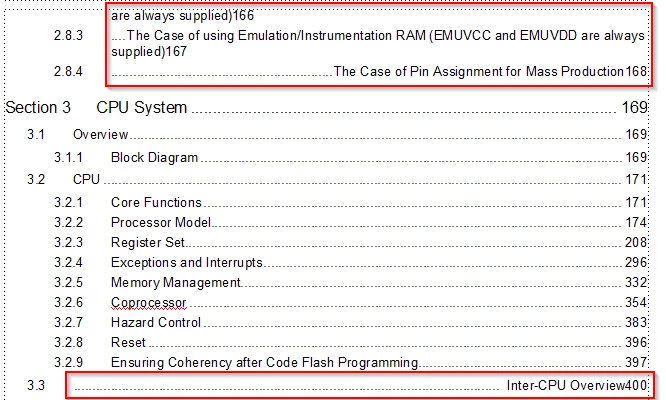
When I created the table of contents for my book, a problem occurred: I had to manually correct the errors to get the table of contents correct.
Is there any solution to optimize the table of contents?
Looking forward to receiving your response!

Best regards,
Quan

This topic has been closed for replies.
Correct answer Winfried Reng

Dear @mk-will , @Barb Binder ,

Nice to receive comments from experts,
I'm using version 2019 and am planning to upgrade to version 2022 but in the current version I can only add a second tab character before the <$pagenum> building block on the reference page for criteria That high school topic manually.

Best regards,
Quan


Hi Quan, you have to enter the second tab on the reference page and then go back to the body page and update your book. Did you do this?

If you cannot enter a tab, the insertion mark is possibly not before the <$pagenum> building block. Use the arrow keys to go to the correct position.

2 replies

frameexpert
Community Expert
Community Expert
September 26, 2023

I think Klaus is correct; some of your headings have leading tabs in them. If you generated Hypertext links when you created the Table of Contents, you can Control+Alt+Click on the faulty entries in the TOC and it will take you to the source headings. Then you can delete the leading tabs and then update the TOC.

frameexpert
Community Expert
Community Expert
September 26, 2023

Here is a short video illustrating the problem and solution:

https://youtu.be/HN5Q_H-j9vo

Quân2929Author
Known Participant
October 5, 2023

hi @frameexpert ,
Sorry for not having time,
I am very happy to receive the answer and I think it is very useful, I will take the time to check my data again.

Thank you very much!

K.Daube
Community Expert
Community Expert
September 26, 2023

IMHO there seem to be TAB craracters in the faulting headings.

Matt-Tech Comm Tools
Community Expert
Community Expert
September 26, 2023

I agree with Rick and Klaus...if you turn on the view of your text symbols, you'll likely find tabs at the beginning of the offending headings. In the case of section 3.3, you'll likely find at least 2 tabs preceding the text.

-Matt Sullivan, FrameMaker Course Creator, Author, Trainer, Consultant