Known Participant
January 29, 2021
Answered

Table of Contents has page number next to main chapter heading

  • January 29, 2021
  • 9 replies
  • 1131 views

Hi all. What am I doing wrong? Why do the page number appear right next to the chapter headings, e.g., "Overview1"? (see attachement)

Appreciate the help. Cheers -- John



    This topic has been closed for replies.
    Correct answer Barb Binder

    Hi John:


    The H1,1stLevelHeadTOC has two tab characters on the line, but three tab stops defined. Just delete the tab at 54.0 pts, Update Style and Remove Overrides when prompted. You will be good to go. 😊


    ~Barb 
     

    9 replies

    Barb Binder
    Community Expert
    Community Expert
    February 6, 2021

    That is the correct line. Change it to match my screenshot from Feb 01, 2021. Update your book.


    ~Barb 

    ~Barb at Rocky Mountain Training
    Barb Binder
    Community Expert
    Community Expert
    February 5, 2021

    Hi John:


    Open the TOC reference page—click on line 10, counting every line from the top. Confirm that this line is using the style "AT,AnnexTitleTOC". Add the word (Informative), as per my screen shot. Update the book. 


    ~Barb 

    ~Barb at Rocky Mountain Training
    johnb3665Author
    Known Participant
    February 6, 2021

    Hi Barb. Hope I'm not being too much of a pain. Here are the steps I just performed:

    1. While looking at the ToC, I changed the view from “Body” to “Reference Page”
    2. Click “Line Numbers” in the View tab. Nothing happened.
    3. Counted down 10 lines, i.e., 10 carriage returns.
    4. Opened the Paragraph Designer and look at the “Style” box.  It was “AT,AnnexTitleTOC” so I decided this was the right line.
    5. However, Line 10 starts with a <$paranum> and not a <$chapnum>     (see attached)What am I doing wrong? 

    Barb Binder
    Community Expert
    Community Expert
    February 3, 2021

    Sorry about that, John. I used a tight crop to protect your content, but there's no secure content on a reference page!


    This should help:


    ~Barb

    ~Barb at Rocky Mountain Training
    johnb3665Author
    Known Participant
    February 5, 2021

    Hi Barb. I've been stumbling with your latest reply. What steps do I take to insert the line you highlighted into the ToC reference page: 

    <$chapnum> (Informative) <$paratext>) .......


    As always, thx! -- JOhn

    Barb Binder
    Community Expert
    Community Expert
    February 1, 2021

    Hi John:


    I belive the Ts are hypertext markers that are being carried over from the source docs. I would need to examine the old working document to be sure.


    That said, if this is the look you are after:


    Then editing AT,AnnexTitleTOC definition on the reference page to look like this should do ti.


    ~Barb 


    ~Barb at Rocky Mountain Training
    johnb3665Author
    Known Participant
    February 2, 2021

    Hi Barb. I'm been trying to implement what you indicate but without sucess on the ToC Reference Page.


    I couldn't find the "AT,AnnexTitleTOC" definition anywhere on the TOC reference page. I did find this experess: "AT,AnnexTitle" in the XML Mapping Tables. But this didn't like the right place. 


    Where should I insert the expression that you mentioned, namely: <$chapnum>(Informative)<$paratext>.....


    Cheers -- John

    Barb Binder
    Community Expert
    Barb BinderCommunity ExpertCorrect answer
    Community Expert
    February 1, 2021

    Hi John:


    The H1,1stLevelHeadTOC has two tab characters on the line, but three tab stops defined. Just delete the tab at 54.0 pts, Update Style and Remove Overrides when prompted. You will be good to go. 😊


    ~Barb 


    ~Barb at Rocky Mountain Training
    johnb3665Author
    Known Participant
    February 1, 2021

    Hi Barb. Your advice worked like a charm. It worked perfectly. Thx -- John

    johnb3665Author
    Known Participant
    February 1, 2021

    Hi Barb. I'm probably testing my luck here, but I have one last question on the TOC. In the annex section - recall the Dropbox link to my FM ToC file - the formating of the annexes are all messed up. The attached image show how it should look - taken from a previous version of this book. I can't figure out how to add what look to be two types of styles in one line - as shown by the two bolded "T"s in each annex line. Here's how the two styles appear in the Paragraph Design > Basic tab:

    -- I, Informative

    -- AI, Annex TOC


    How can I get my current messed-up ToC for the annex section (see the Dropbox FM ToC file) to look like it should in the attached image. (I really need to take your class.)


    Barb Binder
    Community Expert
    Community Expert
    January 31, 2021

    Hey John:


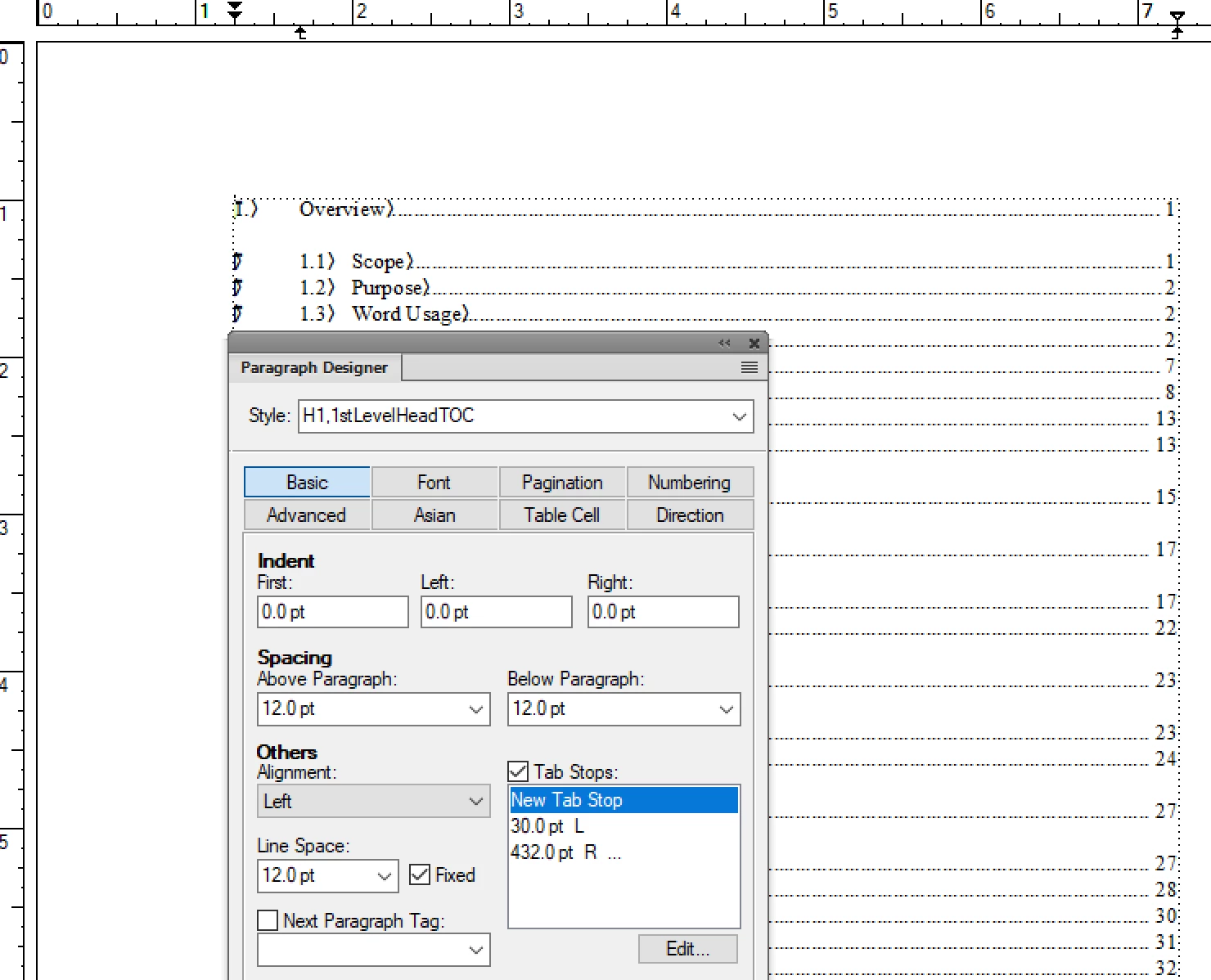
    Ok, the tabs are all in place on the TOC (which is good), so I believe it is an issue of the tab stops on the body page. Can you grab one more screen shot for us?


    Here's the setup:

    • Click in 1.   Overview1 on body page 1. 
    • Enable View > Text Symbols and View > Rulers. Be sure to include the rulers at the top in the screen shot.


    If you are willing to share the TOC with us, I am happy to take a look at it, which will save some time. You can put it on Dropbox and post a link here (public), or click my name above this post and message me directly (private).


    ~Barb 

    ~Barb at Rocky Mountain Training
    johnb3665Author
    Known Participant
    January 31, 2021

    Hi Barb. Certainly. Here's a screen shot of the ToC tab stops on the body of the first page. I'm not comfortable sharing the TOC publically but will share it privately as you suggest. Thx again for all your help. Chees -- John


    Barb Binder
    Community Expert
    Community Expert
    January 29, 2021

    Hey John:


    That is the IX (index) reference page. Can yuou grab a screen shot of the TOC reference page, with View > Text Symbols enabled? The answer lies there. 


    And yes, I do offer online FrameMaker training—both intro and advanced classes. Here are the links for both levels. I taught an intro class earlier this week, so the next one in March.


    ~Barb 

    ~Barb at Rocky Mountain Training
    johnb3665Author
    Known Participant
    January 30, 2021

    Hi Barb. Here's what I found (see attached) in this rather long ToC reference page. Hope it helps. 


    Sorry I missed the course last week. Will try to catch it in late March. 


    Cheers -- John

    Barb Binder
    Community Expert
    Community Expert
    January 29, 2021

    Here is a link to a post I wrote for my students, who were dealing with the same issue:

    https://www.rockymountaintraining.com/adobe-framemaker-adding-tabs-to-a-table-of-contents/


    ~Barb

    ~Barb at Rocky Mountain Training
    johnb3665Author
    Known Participant
    January 29, 2021

    Hi Barb. First, thx for your help. 


    Second, here's what I see in the Reference Pages step:

    Index Specification

          Level2IX
    Level1IX
    1, 2–3
    <$symbols><$numerics><$alphabetics>


    I should have mentioned that I've created a book with numerous chapters and annex. The problem with the page number appearing right after the heading for each chapter/annex (see original post) happens in the book ToC. I haven't even tried creating a ToC within each individual chapter/annex. Any additional thoughts?


    BTW: There seems to be a lot about FM that I don't know. Do you offer an online course on FM 2019? 🙂


    Cheers -- John 

    Community Expert
    January 29, 2021

    Hi John,


    On the reference pages there is something like this for all TOC paragraph formats:

    <$paranum> <$paratext> <$pagenum>

    Before the <$pagenum> building block there must be a tab. Better two tabs so that the page number is also right-aligned, when there are two lines.

    For your heading2 paragraph formats there seem to be enough tabs.

    Check whether you have also tabs before heading1.

    You could also search for tabs (in the search dialog \t) and replace e.g. with something like mmm. Then you can make the tabs visible. Then search for mmm and replace with \t.

    On your body pages this will change after you update your book with the TOC.


    It could also be that the tab stops in the paragraph format are not set correctly.

    Check the tab stops there. There must be two:

    One left aligned for the start of the text.

    One right aligned for the page number.

    It could be that the position of the right aligned tab stop is larger than the text frame width. If it is really the same as the text frame width, try to make it half a millimeter smaller than the text frame width. Or set it to the same value as for the heading2 paragraph format.


    Best regards


    Winfried

    johnb3665Author
    Known Participant
    January 29, 2021

    Hi Winfried. I guess I'm more of a novice with FM then I imaged as I don't understand your comments about "mmm." I've refined my problem a bit in my response to Barb below. Still, thx for the help. Cheers -- John