BJL700
Participant
October 10, 2017
Question

Table rows too high in HTML5

  • October 10, 2017
  • 3 replies
  • 570 views

I'm using FrameMaker 2017 and I'm trying to create HTML5 output.

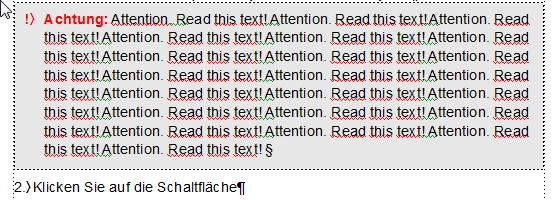
When I have a table row with more than one line of content, the HTML5 output very often (not always) adds additional space below the text.

  • View in FrameMaker 2017

  • View in HTML5 with unwanted (in this case grey) space below the text:
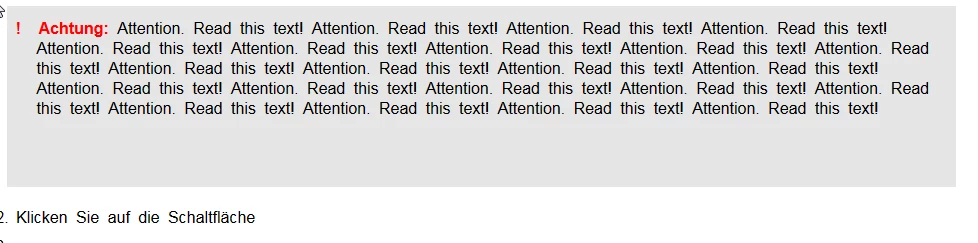
This effect only occurs if I change the table width under Publish Settings: Settings > Style Mapping > Table Styles to e.g. 70% or 100% or 700pt.  If I use the default settings (no settings), the effect does not occur.

This effect occurs in all tables, regardless of the number of rows and columns. If I have a table with multiple rows, the effect may occur in one line but not in the next one.

This topic has been closed for replies.

3 replies

Matt-Tech Comm Tools
Community Expert
Community Expert
October 16, 2017

Can you post the HTML code for the table?

-Matt Sullivan, FrameMaker Course Creator, Author, Trainer, Consultant
BJL700
BJL700Author
Participant
November 9, 2017

<div width="100%" align="left">

  <table border-spacing="0" dir="ltr" class="table3" border-collapse="collapse" style="width: 70%; max-width: 100% ;height: auto">

   <tr class="tr4">

   <td class="td5">

   <p dir="ltr" class="FM_Hint_note"><span class="FM_Hint_black">!<span style="padding-left: 12pt;" class="FMAutoNumber_1"></span>Hinweis: </span>Attention. Read this text! Attention. Read this text!Attention. Read this text!Attention. Read this text!Attention. Read this text!Attention. Read this text!Attention. Read this text!Attention. Read this text!Attention. Read this text!Attention. Read this text!Attention. Read this text!Attention. Read this text!Attention. Read this text!Attention. Read this text!Attention. Read this text!Attention. Read this text!Attention. Read this text!Attention. Read this text!Attention. Read this text!Attention. Read this text!Attention. Read this text!Attention. Read this text!Attention. Read this text!Attention. Read this text!Attention. Read this text!Attention. Read this text!Attention. Read this text!Attention. Read this text!Attention. Read this text!Attention. Read this text! Attention. Read this text!Attention. Read this text!Attention. Read this text!Attention. Read this text!Attention. Read this text!Attention. Read this text!Attention. Read this text!Attention. Read this text!</p>

</td>

</tr>

  </table>

</div>

Matt-Tech Comm Tools
Community Expert
Community Expert
November 9, 2017

First, 2 questions:

  • Does manually removing the height: auto attribute in the html output file (via a text editor) resolve your issue?
  • Have you mapped the Table Style to a CSS table style in your Style Mapping tab, and does mapping to a table style resolve the issue?

I see that you haven't mapped Hint_note or Hint_black to a CSS style like CellBody. If you do that, does the issue resolve?

-Matt Sullivan, FrameMaker Course Creator, Author, Trainer, Consultant