Known Participant
April 10, 2024
Answered

Table style when importing XML

When I import the XML, the columns and rows are mixing in a single-column table, how do I solve this? I'm attaching how it should be and how it's looking.
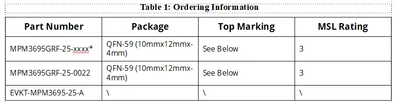
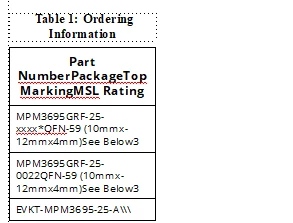


This topic is closed to new replies. Start a new post to keep the conversation going.
Matt-Tech Comm Tools
Matt-Tech Comm ToolsCorrect answer
Community Expert
April 12, 2024

But I need to add this attribute in EDD too, right? 


No, the XML attribute is processed into an fm property when opened by fm. Then the fm property is processed into an attribute again when saving to XML.

Do you have the width value set in the XML?

If not, set a value for the property in the rule as well.

-Matt Sullivan, FrameMaker Course Creator, Author, Trainer, Consultant

15 replies

frameexpert
Community Expert
Community Expert
April 10, 2024

Can you post the XML of that table? Thanks.

Translate
www.frameexpert.com
Known Participant
April 10, 2024

Hey, here it is: 


Translate
frameexpert
Community Expert
Community Expert
April 10, 2024

Thanks for the screenshot. It would be easier if you copied/pasted the XML into a post.


Your structured application should refer to a set of Read Write Rules that determine which elements get converted to certain table parts in FrameMaker. Do you have a Read Write Rules file referred to in your structured application?

Translate
www.frameexpert.com

