
Participating Frequently
January 10, 2025
Question

Template Question (1 of 3) -

  • January 10, 2025
  • 2 replies
  • 176 views

Next question,

2.  I have "Appendix" as a H1, and created two H2 Appendix paragraph tags, so in the TOC, they appear as Appendix A: {title}, Appendix B: {next title}, etc. This allows them to appear in the TOC nicely and makes appending these items easily. Challenge is for generated files, as the user created appendicies numericaly increment fine. For the LOT, LOF (for now are appended) and my Glossary (Thanks to the Community for tips, it looks great), the H2 Appendix does not pass through the paragraph numbering, despite setting it up in the book. 


Main Document

Paragraph Styles Name --> Numbering Format
Appendix -- Title1 --> Z:Appendix <A=1>: 

Appendix -- Title1+ --> Z:Appendix <A+>: 


In the generated files, I use the "Appendix -- Title1+" paragraph style as the first line in the LOT, LOF and AML (Glossary). Initially, the numbering format reset to "A=1" when adding the line, so I modified the component. Here is what I added for the numbering in each generated file's paragraph designer entry.

Appendix -- Title1+ --> Z:Appendix <A+>:


This is what I see
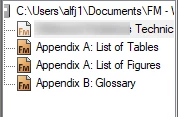
 

The appendix has seven documents in it: A-E in the main document. I thought it would be easy to do a pass-through with the paragraph numbering, so I appended the generated files. The LOT should be F, the LOF should increment to G and the Glossary then Appendix H. I can make each user generated file a separate document if needed, but that would seem to be a lot of work for a bunch of one and two page items. How to correct the numbering. I don't know what I'm missing. 


Am I articulating the ask in lucid terms? Appreciate the assistance.


    2 replies

    Community Expert
    January 10, 2025

    Could you give us the text of the TOC reference page? And with info which line is from which paragraph?

    Possibly the numbering block is missing for these paragraphs.

    Bill_M.Author
    Participating Frequently
    January 10, 2025

    Thank you, @Winfried Reng . If I understand the ask correctly, I pasted what the Reference Page looks like in the main document which includes the TOC, LOT and LOF sections. The paragraph styles are included.


    I think I confused you unintentionally as I cited "TOC" where I meant that generically. This document uses a Mini TOC. I'll provide both here in-case the LOT and LOF use the TOC data.


    Here is the first aforementioned Reference Page

    Here are the paragraph styles for the TOC section above.

    Heading1TOC

    Heading2TOC


    Here is the text of the Mini TOC

    gotoObjectId :<$ObjectType> <$ObjectId>
    <$paratext> <$pagenum>     [Heading1MTOC]
    <$paratext> <$pagenum>     [Heading2MTOC]
    <$paratext> <$pagenum>     [Vendor - Heading2MTOC]
    <$paranum> <$paratext> <$pagenum>     [Appendix -- Title1MTOC]
    <$paranum> <$paratext> <$pagenum>     [Appendix -- Title1+MTOC]

    Which of course, loses something on the paste, so here is the graphical representation


    Note: The style "Vendor - Heading2MTOC" is part of a vendor template I created with each field label in the respective paragraph's numbering, linked with next paragraph values. Quite nice to enter all the values across ten vendors easily with just an enter key. As it's a H2 variant, I want it included in the Mini TOC.


    I think I provided what you requested. If I am amiss or you need anything else, please let me know. Thank you for your assistance.

    Bill_M.Author
    Participating Frequently
    January 10, 2025

    Paste error on the title. Apologies. Should be, "Template Question (2 of 3) - Paragraph Numbering Passthrough Challenge"