
Inspiring
February 1, 2022
Question

Text aligned with tabs in FrameMaker2020 is not aligned when published to HTML5

  • February 1, 2022
  • 3 replies
  • 738 views

I have a user guide that contains numerous examples of code throughout the source files.

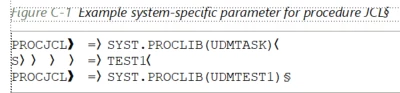
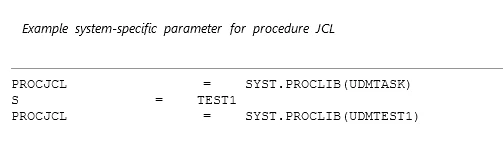
I have aligned spacing between words with tabs to mimic what is shown in a console. However, when I publish to HTML5, all alignment is lost.

Example:

FM Source:
HTML5 output:
Please let me know if there is some work-around solution if this alignment feature does not yet exist in FM2020. Because there are numerous incidences of this type of code throughout the document, I am not in a position of realignment using tables, etc. I really need a solution on the output end, such as a CSS style.

Thanks in advance for your help

    This topic has been closed for replies.

    3 replies

    Known Participant
    August 22, 2022

    Hello, did you arrive at a solution for this problem?

    We are having the same issue.

    Whitespace is not being recognized in the HTML output.

    I'm not sure what's meant by non-breaking spaces but presumably not the FM equivalent of  

    Did you ever raise this as a bug? I understand that 'things' don't reconise tabs but in the (old) links you were recommended to read, 'they' said they had plans to consider using margins or updating the css to accomodate this issue. I wonder if that has happened, does anyone know?

    Inspiring
    July 10, 2023

    In the end I created a table with the number of columns equal to the number of tabs you would ordinarily use for your longest line of text.

    Next, using spanning and copying/pasting I was able to align things the way I wanted. Here's a sample.


    4everJang
    Legend
    February 4, 2022

    Tabs are not reliable in any output and they are not really reliable in FM, either. I have seen many authors use tabs to do alignment in MS Word, FM and other editors and it really never works out in all the output formats.

    What you should do is replace all tabs with a number of non-breaking spaces and make sure the code samples are using a monospace font such as Courier (which they probably already are). Of course this will turn out to be a huge task, as not all tabs should become the same number of non-breaking spaces (which is the real cause of the problem).

    If your code samples use a specific paragraph tag without overrides to the tab positions, this can be scripted, so that at least your current code samples have the correct styling in place. Then it is a matter of checking whether a sequence of non-breaking spaces survives the built-in HTML5 output process. There is a decent chance that this will be the case.

    Going forward you should really remove the tabs from the monospace paragraph format and train your authors to not use tabs in their code samples at all, or export the code samples after normalising the tabs to whitespace characters. 

    Inspiring
    February 8, 2022

    Thanks for your reply. I am using a monospace font in a paragraph tag I created for this purpose.

    Would you please elaborate on your recommendation to "normallizing" the tabs?

    Thanks!

    Matt-Tech Comm Tools
    Community Expert
    Community Expert
    February 8, 2022

    Normalizing the tabs = replacing tabs with whitespace characters in the fixed width font

    -Matt Sullivan, FrameMaker Course Creator, Author, Trainer, Consultant
    Jeff_Coatsworth
    Community Expert
    Community Expert
    February 1, 2022

    Have a look at this thread - https://community.adobe.com/t5/framemaker-discussions/publish-to-html5-weird-span-output-for-tab-stops/td-p/8528276 - it seems to imply that tabs aren't really supported well in HTML.

    Inspiring
    February 8, 2022

    Thanks, Jeff. I had read that thread earlier. I am working on a workaround that will be less tedious than using non-breaking spaces, but I am not that hopeful that I will find one!