

Vicki38950098ejye
Known Participant
September 12, 2024
Question

text formatting in DITA

  • September 12, 2024
  • 2 replies
  • 272 views

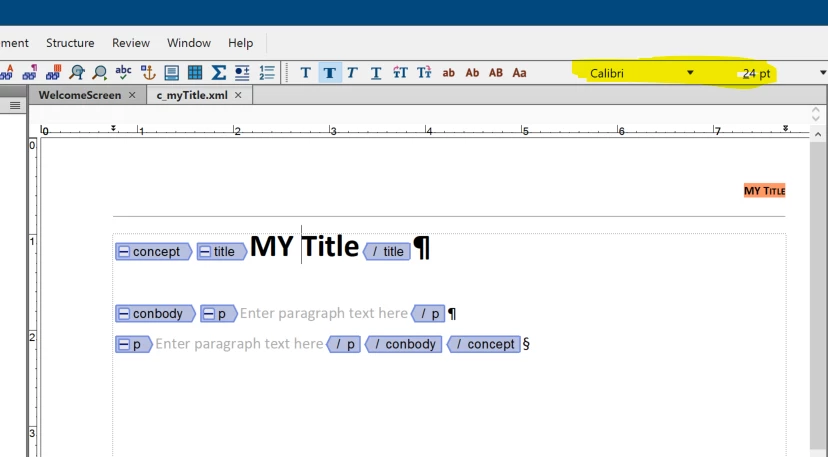
I have a DITA Concept xml file.  I want to be able to change the font for a tag.


In this case, my title element is Calibri 24 pt.  This must be the default.


When I change it to Arial 14 pt and 'save' it, it doesn't save.


I open it again, and it is the Calibri font.

How can I get the styling or formatting that I want in DITA?

Thank you,
Vicki
 

    This topic has been closed for replies.

    2 replies

    frameexpert
    Community Expert
    Community Expert
    September 12, 2024

    This video should be helpful. Please post followup questions that you may have. Thank you.


    https://www.youtube.com/watch?v=Ebowun9km4I&t=525s

    Vicki38950098ejye
    Known Participant
    September 12, 2024

    Hi,
    The 2 video links are the same video, and video is title:   Customize FrameMaker DITA Templates

    In the video he talks about customizing attributes and the id attribute to an element, in particular.


    The other link talks about changes fonts and doing it at the output template.
    'I want to change the default font in my Structured Output templates.'

    I want to change my font from Calibri to Ariel in the DITA xml file.
    I imported Paragraph Designer and applied the font style I wanted, and saved.

    But when I open it again, it has reverted back to Calibri.

    Can I only change my fonts in an output style sheet?

    Thank you,

    Vicki

    Community Expert
    September 12, 2024

    Hi,

    Rick Quatro said in this thread where the template files are:

    https://community.adobe.com/t5/framemaker-discussions/changes-to-structured-output-templates-can-t-be-saved/m-p/14236521

    C:\Users\<UserName>\AppData\Roaming\Adobe\FrameMaker\<Version>\ditafm-output.ini

    Open it with a text editor and find the TemplateDir key:

    [General Options]
    SavePDFViaBookRoute=0
    ;template dir can be absolute path or appended with $STRUCTDIR or relative to installed directory
    TemplateDir=C:\Users\rick\AppData\Roaming\Adobe\FrameMaker\17\CustomTemplates

    I do not use DITA, and I do not know, if there are other types of templates.

    Best regards, Winfried