Inspiring
October 10, 2018
Answered

TextRange - SubCol

  • October 10, 2018
  • 1 reply
  • 1160 views

Hello,

I'm using template with 2 or 3 column textframe.

I'm trying to make a script that avoid hyphen at end of column.

Getting the last pgf of a column, getting the end of line type is not a problem (Constants.FTI_LineEnd).

To check if a pgf is on both column, i'm looping through my pgf to find when the textrange, i'm using, change of column.

I can only get the Id Column from the start of the pgf (pgf.InTextObj.Unique - InTextObj is a SubCol).

Is there a way to know on which column my textrange is?

var vCurrentDoc=app.ActiveDoc;

// go to last pgf of column

var pgf = vCurrentDoc.MainFlowInDoc.FirstTextFrameInFlow.FirstSubCol.LastPgf;

// select the pgf

var textRange = new TextRange();

     textRange.beg.obj = pgf;

     textRange.beg.offset = 0;

     textRange.end.obj = pgf;

     textRange.end.offset = Constants.FTI_LineEnd;

var textItems = vCurrentDoc.GetTextForRange(textRange, Constants.FTI_String);

if(textItems.length > 0){

    vCurrentDoc.TextSelection = textRange;

     var vLineEnd = pgf.GetText(Constants.FTI_LineEnd);

     var vOriginalLine = vLineEnd.len;

     var CheckRange = new TextRange();

     var vCheck = 0;

     // to get the Id column of the pgf

     var vColNum = pgf.InTextObj.Unique;

     // no need to check last end of line = end of pgf => vOriginalLine-1

     while (vCheck < vOriginalLine-1) {

          CheckRange.beg.obj = pgf;

          CheckRange.beg.offset = (vLineEnd[vCheck].offset)-1;

          CheckRange.end.obj = pgf;

          CheckRange.end.offset = vLineEnd[vCheck].offset;

          vCurrentDoc.TextSelection = CheckRange;

// HERE is WHEREI'M STUCK

          var vColNumTR = ?????????;

// check fi column change

          if (vColNum != vColNumTR){

               // process

          }

          vCheck = vCheck +1;

     }

     vCurrentDoc.TextSelection = textRange;

}

....

Thanks in advance for the help

This topic has been closed for replies.
Correct answer frameexpert

#target framemaker

var doc, pgf, textList, i;

doc = app.ActiveDoc;

// Paragraph containing the cursor:

pgf = doc.TextSelection.beg.obj;

textList = pgf.GetText (Constants.FTI_LineEnd | Constants.FTI_SubColEnd);

for (i = 0; i < textList.length; i += 1) {

    // Look for a subcolumn end.

    if (textList.dataType === Constants.FTI_SubColEnd) {

        if (i > 0) { // Check the previous text item, which is a line end.

            // 0 = normal line end; 1 = soft return; 2 = hyphen

            if (textList[i - 1].idata === 2) {

                alert ("last line is hyphenated.");

            }

        }

    }

}

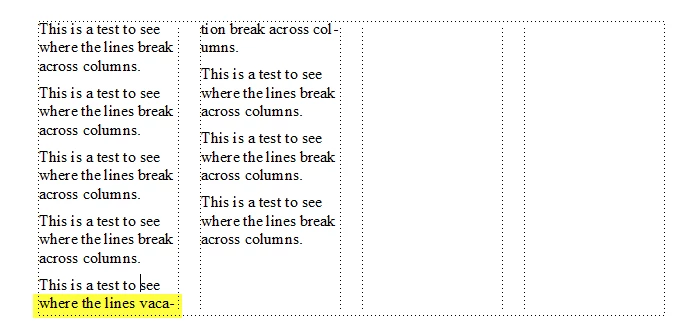
The code above will tell you if the paragraph has a line that hyphenates across a sub column.

The important thing to remember about text items when you use GetText: they always appear in document order. So when you find the SubColEnd in the list, the previous text item has to be a LineEnd, assuming that you just get these item types like line 9.

Here is a screenshot of the document I tested it with. I put my cursor in the last paragraph of the first subcolumn.

1 reply

frameexpert
Community Expert
Community Expert
October 10, 2018

A simpler approach would be to do something like this. This code works on the paragraph containing the cursor.

#target framemaker

var doc, pgf, textList;

doc = app.ActiveDoc;

pgf = doc.TextSelection.beg.obj;

textList = pgf.GetText (Constants.FTI_SubColBegin | Constants.FTI_SubColEnd);

alert (textList.length);

If the paragraph breaks across a column (or a text frame), then line 10 will report 2; otherwise, you will get a 0 or 1. You could wrap this in a nice function and call it in your script for each paragraph at the end of a column.

BTW, I haven't examined each line of your code, but I know that line 9 is incorrect. The Constants.FTI_LineEnd constant is used in the GetText method and does not indicate the offset of a given line. Remember that the values of "Constants" are constant; they don't change.

-Rick

www.frameexpert.com
frameexpert
Community Expert
Community Expert
October 10, 2018

I stand corrected about one of my statements. It is possible to have a long paragraph that spans more than 2 columns, so line 10 might report 4 (or 6 or 8, etc.). So your best test would be textList.length > 1.

www.frameexpert.com